Chapter 03 - Physical, Logical devices and Surface
In this chapter we will progress in the definition of the Vulkan structures required to render a 3D scene. Specifically, we will set up the Physical and Logical devices and a Surface.
You can find the complete source code for this chapter here.
Physical device selection
A physical device represents any piece of hardware that provides a complete implementation of the Vulkan interface (usually a physical GPU). You can have several Vulkan capable physical devices (you may have more than one GPU), but you will usually just use one (we will not be dealing with multi-GPU rendering here). A side note, as we progress through this book, we will define many concepts. In order to help you in understanding the relationship between all of them, we will be filling up a diagram. Here you can find the ones that show the elements described so far.
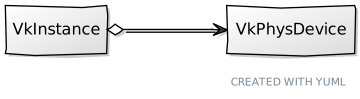
So let's go back to coding and start by encapsulating all the code for selecting and creating a physical device in a new struct named VkPhysDevice (in the file src/eng/vk/vkDevice.zig, remember to update the mod.zig file to include it: pub const phys = @import("vkPhysDevice.zig");). It starts like this:
File: src/eng/vk/vkDevice.zig
const std = @import("std");
const vulkan = @import("vulkan");
const com = @import("com");
const vk = @import("mod.zig");

const log = std.log.scoped(.vk);
const reqExtensions = [_][*:0]const u8{vulkan.extensions.khr_swapchain.name};

const QueuesInfo = struct {
    graphics_family: u32,
    present_family: u32,
};

pub const VkPhysDevice = struct {
    features: vulkan.PhysicalDeviceFeatures,
    pdev: vulkan.PhysicalDevice,
    props: vulkan.PhysicalDeviceProperties,
    queuesInfo: QueuesInfo,
    memProps: vulkan.PhysicalDeviceMemoryProperties,
    ...
};
The QueuesInfo struct will hold the family indices of the queues used to submit graphics or present commands (more on this later). The VkPhysDevice struct stores the features of the physical device (features), a reference to the Vulkan physical device (pdev), its properties (props), the queues information and the device memory properties (memProps). It provides a create function which instantiates this struct and that starts like this:
File: src/eng/vk/vkDevice.zig
pub const VkPhysDevice = struct {
    ...
    pub fn create(allocator: std.mem.Allocator, constants: com.common.Constants, instance: vulkan.InstanceProxy, vkSurface: vk.surf.VkSurface) !VkPhysDevice {
        const pdevs = try instance.enumeratePhysicalDevicesAlloc(allocator);
        defer allocator.free(pdevs);

        var list = try std.ArrayList(VkPhysDevice).initCapacity(allocator, 1);
        defer list.deinit(allocator);
        ...
    }
    ...
};
As it has been said before, we may have more than one Vulkan physical device in our host machine. We first need to ask the Vulkan instance to retrieve the list of supported vulkan devices (by calling the enumeratePhysicalDevicesAlloc function). After that we iterate over that list trying to get the most suitable one:
File: src/eng/vk/vkDevice.zig
pub const VkPhysDevice = struct {
    ...
    pub fn create(allocator: std.mem.Allocator, constants: com.common.Constants, instance: vulkan.InstanceProxy, vkSurface: vk.surf.VkSurface) !VkPhysDevice {
        ...
        for (pdevs) |pdev| {
            const props = instance.getPhysicalDeviceProperties(pdev);
            const memProps = instance.getPhysicalDeviceMemoryProperties(pdev);
            const features = instance.getPhysicalDeviceFeatures(pdev);
            log.debug("Checking [{s}] physical device", .{props.device_name});

            if (!try checkExtensionSupport(instance, pdev, allocator)) {
                continue;
            }
            if (try hasRequiredQueues(instance, pdev, vkSurface, allocator)) |queuesInfo| {
                const vkPhysDevice = VkPhysDevice{
                    .features = features,
                    .pdev = pdev,
                    .props = props,
                    .queuesInfo = queuesInfo,
                    .memProps = memProps,
                };
                const name_slice = std.mem.sliceTo(&vkPhysDevice.props.device_name, 0);
                if (std.mem.eql(u8, constants.gpu, name_slice)) {
                    try list.insert(allocator, 0, vkPhysDevice);
                    break;
                }
                if (props.device_type == vulkan.PhysicalDeviceType.discrete_gpu) {
                    try list.insert(allocator, 0, vkPhysDevice);
                } else {
                    try list.append(allocator, vkPhysDevice);
                }
            }
        }
        if (list.items.len == 0) {
            return error.NoSuitablePhysicalDevice;
        }
        const result = list.items[0];

        log.debug("Selected [{s}] physical device", .{result.props.device_name});
        return result;
    }
    ...
};
For each physical device we will retrieve all the properties and features we need to use it and to support the device selection. We need to check for two things:
- That the device is capable of presenting images to a screen. This is done by calling the
checkExtensionSupportfunction. - That the device supports the graphics queue family. This is done by calling the
hasGraphicsQueueFamilyfunction.
You may be surprised that this is not part of the core API, but think that you may have GPUs that are used just for computing or that are not even attached to any display (they may do off-screen rendering). So being this capability optional, we need to be sure that the selected device supports it. We will show later on the implementation of those two functions.
If the device fulfills both conditions, we then check if its name matches the preferred device name (if this has been specified). If so, we already have our candidate and there's no need to continue so we break the loop. If not, we just add that device to the list of potential candidates and continue with the loop. We tend to select discrete GPU devices, that is, non integrated GPUs, so we add them on top of the list to have most priority.
Once we have finished with the loop, if we have not selected a device yet we just pick the first one from the list. You can add more sophistication to this selection process trying to pick the most capable one, but at this moment this approach should be enough. If no device has been selected we return an error.
The checkExtensionSupport function is defined like this:
File: src/eng/vk/vkDevice.zig
pub const VkPhysDevice = struct {
    ...
    fn checkExtensionSupport(
        instance: vulkan.InstanceProxy,
        pdev: vulkan.PhysicalDevice,
        allocator: std.mem.Allocator,
    ) !bool {
        const propsv = try instance.enumerateDeviceExtensionPropertiesAlloc(pdev, null, allocator);
        defer allocator.free(propsv);

        for (reqExtensions) |ext| {
            for (propsv) |props| {
                if (std.mem.eql(u8, std.mem.span(ext), std.mem.sliceTo(&props.extension_name, 0))) {
                    break;
                }
            } else {
                return false;
            }
        }

        return true;
    }
};
It just enumerates the available extensions and checks if it supports the extensions stored in the reqExtensions constants, which, by now, stores the name of the KHHR Swapchain extension.
Queue families
Since the only pending function to present now is the one named hasRequiredQueues it is now the moment to talk a little bit about Vulkan queues. In Vulkan, any work is performed by submitting commands buffers through specific queues. We do not command the GPU to immediately draw a specific shape, we submit a command to a queue which contains the instructions to perform a operation like render the vertices that are part of that shape. Commands in those queues are consumed and executed asynchronously. Devices have different types of queues, which are organized in families. Each queue family only accepts a specific set of command types. For example, we may have graphic commands used to render and compute commands, each of these command types may require to be submitted to different types of queue. In our case, we want to be sure that the selected device is capable of handling graphics commands, which is what we check within the hasRequiredQueues function:
File: src/eng/vk/vkDevice.zig
pub const VkPhysDevice = struct {
    ...
    fn hasRequiredQueues(
        instance: vulkan.InstanceProxy,
        pdev: vulkan.PhysicalDevice,
        vkSurface: vk.surf.VkSurface,
        allocator: std.mem.Allocator,
    ) !?QueuesInfo {
        const families = try instance.getPhysicalDeviceQueueFamilyPropertiesAlloc(pdev, allocator);
        defer allocator.free(families);

        var graphics_family: ?u32 = null;
        var present_family: ?u32 = null;

        const surfaceKhr = vkSurface.surface;

        for (families, 0..) |properties, i| {
            const family: u32 = @intCast(i);

            if (graphics_family == null and properties.queue_count > 0 and properties.queue_flags.graphics_bit) {
                graphics_family = family;
            }

            if (present_family == null and properties.queue_count > 0 and
                (try instance.getPhysicalDeviceSurfaceSupportKHR(pdev, family, surfaceKhr)) == vulkan.Bool32.true)
            {
                present_family = family;
            }
        }

        if (graphics_family != null and present_family != null) {
            return QueuesInfo{
                .graphics_family = graphics_family.?,
                .present_family = present_family.?,
            };
        }

        return null;
    }
    ...
};
We iterate over the supported queue families, in order to check if they have a flag that shows that this queue family is capable of supporting graphics commands. We will explain in more detail the concepts related to queues and commands as we progress through the book.
Logical Device
Now that we have a physical device we can start with the logical device. Vulkan separates these two concepts, while a physical device directly maps directly to a physical capable hardware, a logical device represents the actual interface to that hardware. The logical device will store all the resources that we create alongside with their state.
In case you wonder, you may create more than one logical device, it is another layer of abstraction over our GPU (the physical device) that allows us to manage the resources. In any case, here we will stick just with one logical device instance. The next picture shows the diagram updated.

As in our previous samples, we will create a new struct, named VkDevice to wrap device creation and some utility functions around it (Remember to update the mod.zig file to include it: pub const dev = @import("vkDevice.zig");). It provides a create function to instantiate it which starts like this:
File: src/eng/vk/vkDevice.zig
const std = @import("std");
const vulkan = @import("vulkan");
const vk = @import("mod.zig");

const log = std.log.scoped(.vk);
const reqExtensions = [_][*:0]const u8{vulkan.extensions.khr_swapchain.name};

pub const VkDevice = struct {
    deviceProxy: vulkan.DeviceProxy,

    pub fn create(allocator: std.mem.Allocator, vkInstance: vk.inst.VkInstance, vkPhysDevice: vk.phys.VkPhysDevice) !VkDevice {
        const priority = [_]f32{0};

        var uniqueFamilies: [3]u32 = undefined;
        var uniqueCount: u32 = 0;
        for ([_]u32{
            vkPhysDevice.queuesInfo.graphics_family,
            vkPhysDevice.queuesInfo.present_family,
            vkPhysDevice.queuesInfo.compute_family,
        }) |family| {
            var alreadyPresent = false;
            for (uniqueFamilies[0..uniqueCount]) |existing| {
                if (existing == family) {
                    alreadyPresent = true;
                    break;
                }
            }
            if (!alreadyPresent) {
                uniqueFamilies[uniqueCount] = family;
                uniqueCount += 1;
            }
        }

        var qciBuf: [3]vulkan.DeviceQueueCreateInfo = undefined;
        for (uniqueFamilies[0..uniqueCount], 0..) |family, i| {
            qciBuf[i] = .{
                .queue_family_index = family,
                .queue_count = 1,
                .p_queue_priorities = &priority,
            };
        }
        const qci = qciBuf[0..uniqueCount];

        const features3 = vulkan.PhysicalDeviceVulkan13Features{
            .dynamic_rendering = vulkan.Bool32.true,
            .synchronization_2 = vulkan.Bool32.true,
        };
        const features2 = vulkan.PhysicalDeviceVulkan12Features{
            .p_next = @constCast(&features3),
        };
        const features = vulkan.PhysicalDeviceFeatures{
            .sampler_anisotropy = vkPhysDevice.features.sampler_anisotropy,
        };

        const devCreateInfo: vulkan.DeviceCreateInfo = .{
            .queue_create_info_count = @intCast(qci.len),
            .p_next = @ptrCast(&features2),
            .p_queue_create_infos = qci.ptr,
            .enabled_extension_count = reqExtensions.len,
            .pp_enabled_extension_names = reqExtensions[0..].ptr,
            .p_enabled_features = @ptrCast(&features),
        };
        const device = try vkInstance.instanceProxy.createDevice(vkPhysDevice.pdev, &devCreateInfo, null);

        const vkd = try allocator.create(vulkan.DeviceWrapper);
        vkd.* = vulkan.DeviceWrapper.load(device, vkInstance.instanceProxy.wrapper.dispatch.vkGetDeviceProcAddr.?);
        const deviceProxy = vulkan.DeviceProxy.init(device, vkd);

        return .{ .deviceProxy = deviceProxy };
    }
    ...
};
The struct VkDevice is the one that will hold our Vulkan logical device. We will use that structure for the creation of the resources we will need later on. We start by defining the queues families that this logical device will use. Later on, when we create queues, but now we will need to specify the queue family which it belongs to. If that queue family has been not be enabled for the logical device we will get an error. In this case we will opt for enabling all the queues families. The family represents the purpose of that queue, there will be queue families for submitting graphics commands, presentating results to screen, etc. Differenr queues purpose can share the same gamiliy index. For exampple we can have a queue gamily which allows queues that can be used for graphics and compute commands. This is why we filter those cases to just create the families we need for the purposes we are interested in.
After that, we basically create an array of DeviceQueueCreateInfo structs which will hold the index of each queue family and its priority. The priority is mechanism that allows us to instruct the driver to prioritize the work submitted by using the priorities assigned to each queue family. However, this is prioritization mechanism is not mandated in the specification. Drivers are free to apply the algorithms they consider in order to balance the work. Therefore, in our case we will just set priorities to a fixed value of 0 (which is the default value for the lowest priority, we simply don't care). Those families can be the same, so if this the case we will just use the first one by setting the queueCount to 1.
We need to enable some features that are present in the PhysicalDeviceVulkan13Features struct to enable dynamic render and new synchronization functions (also called sync2) which we will use in next chapters. We will also enable sampler anisotropy (we will use it later on for textures) if available by setting the proper flag in the PhysicalDeviceFeatures struct.
With all of the above we can fill up the structure required to create a logical device, which is called DeviceCreateInfo.
To complete the VkDevice struct, here are the rest of the functions:
File: src/eng/vk/vkDevice.zig
pub const VkDevice = struct {
    ...
    pub fn cleanup(self: *VkDevice, allocator: std.mem.Allocator) void {
        log.debug("Destroying Vulkan Device", .{});
        self.deviceProxy.destroyDevice(null);
        allocator.destroy(self.deviceProxy.wrapper);
    }

    pub fn wait(self: *VkDevice) !void {
        try self.deviceProxy.deviceWaitIdle();
    }
};
As you can see they are basically a cleanup function to free resources plus one additional function named wait which will be used later on. This function just calls the Vulkan deviceWaitIdle function which waits that all the pending operations on any queue for that device complete.
Surface
Once that we have defined the VkPhysDevice it is time to create a surface to display the rendering results. In order to create the surface we will create a new struct named VkSurface (Remember to update the mod.zig file to include it: pub const surf = @import("vkSurface.zig");). The following picture updates all the concepts viewed up to now with this new struct.
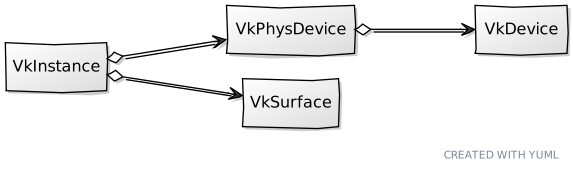
The VkSurface struct starts like this:
File: src/eng/vk/vkCtx.zig
const std = @import("std");
const sdl3 = @import("sdl3");
const vulkan = @import("vulkan");
const vk = @import("mod.zig");

const log = std.log.scoped(.vk);

pub const VkSurface = struct {
    surface: vulkan.SurfaceKHR,

    pub fn cleanup(self: *VkSurface, vkInstance: vk.inst.VkInstance) void {
        vkInstance.instanceProxy.destroySurfaceKHR(self.surface, null);
    }

    pub fn create(window: sdl3.video.Window, vkInstance: vk.inst.VkInstance) !VkSurface {
        const vkHandle = vkInstance.instanceProxy.handle;
        const instancePtr: ?*sdl3.c.struct_VkInstance_T = @ptrFromInt(@intFromEnum(vkHandle));

        const surface = sdl3.vulkan.Surface.init(window, instancePtr, null) catch |err| {
            const sdlError = sdl3.c.SDL_GetError();
            log.err("Failed to create Vulkan surface. SDL Error: {s}, Zig Error: {}", .{ sdlError, err });
            return err;
        };

        return .{ .surface = @enumFromInt(@intFromPtr(surface.surface)) };
    }
    ...
};
As you can see we just use the init function from sdl3.vulkan.Surface to create the surface. The handle obtained in this call will be used later on to be able to construct the artifacts required to render something in the screen.
We also provide a function to retrieve surface capabilities:
File: src/eng/vk/vkCtx.zig
pub const VkSurface = struct {
    ...
    pub fn getSurfaceCaps(self: *const VkSurface, vkInstance: vk.inst.VkInstance, vkPhysDevice: vk.phys.VkPhysDevice) !vulkan.SurfaceCapabilitiesKHR {
        return try vkInstance.instanceProxy.getPhysicalDeviceSurfaceCapabilitiesKHR(vkPhysDevice.pdev, self.surface);
    }
    ...
};
We will also provide a function to retrieve a supported surface format:
File: src/eng/vk/vkCtx.zig
pub const VkSurface = struct {
    ...
    pub fn getSurfaceFormat(self: *const VkSurface, allocator: std.mem.Allocator, vkInstance: vk.inst.VkInstance, vkPhysDevice: vk.phys.VkPhysDevice) !vulkan.SurfaceFormatKHR {
        const preferred = vulkan.SurfaceFormatKHR{
            .format = .b8g8r8a8_srgb,
            .color_space = .srgb_nonlinear_khr,
        };

        const surfaceFormats = try vkInstance.instanceProxy.getPhysicalDeviceSurfaceFormatsAllocKHR(
            vkPhysDevice.pdev,
            self.surface,
            allocator,
        );
        defer allocator.free(surfaceFormats);

        for (surfaceFormats) |sfmt| {
            if (std.meta.eql(sfmt, preferred)) {
                return preferred;
            }
        }

        if (surfaceFormats.len == 0) {
            return error.NoSurfaceFormats;
        }

        return surfaceFormats[0];
    }
    ...
};
The first thing we do is set up a preferred surface format. This will be the one we select if we find is supported by the physical device. After that, we first call the getPhysicalDeviceSurfaceFormatsAllocKHR function to get the total number of formats supported. We iterated over them trying to find the preferred one, returning an error if no formats have been found or the first one in case the preferred one is not supported.
To complete the VkSurface struct source code we just add a cleanup function:
File: src/eng/vk/vkCtx.zig
pub const VkSurface = struct {
    ...
    pub fn cleanup(self: *VkSurface, vkInstance: vk.inst.VkInstance) void {
        vkInstance.instanceProxy.destroySurfaceKHR(self.surface, null);
    }
    ...
};
Queues
As it was introduced before, the way to submit work to our GPU is by submitting command buffers to queues. These command buffers contain the instructions that will be executed when that job is carried on. An important concept to emphasize when examining the instructions for commands, is that this will not be executed immediately, we are just recording the commands. Commands need to be submitted to a queue to have the chance of being executed. Once submitted it is up to the GPU to execute them. We will see later on what is the execution order and which synchronization mechanisms are available.
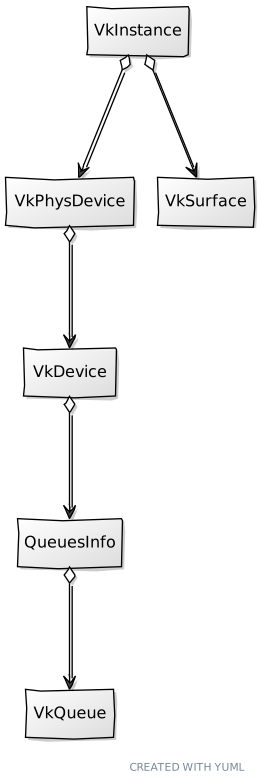
We will create a new struct which models queue retrieval, named VkQueue (Remember to update the mod.zig file to include it: pub const queue = @import("vkQueue.zig");). The VkQueue struct itself is very simple:
File: src/eng/vk/vkCtx.zig
const vulkan = @import("vulkan");
const vk = @import("mod.zig");

pub const VkQueue = struct {
    handle: vulkan.Queue,
    family: u32,

    pub fn create(vkCtx: *const vk.ctx.VkCtx, family: u32) VkQueue {
        return .{
            .handle = vkCtx.vkDevice.deviceProxy.getDeviceQueue(family, 0),
            .family = family,
        };
    }
};
In the VkQueue create function we just invoke the getDeviceQueue function which receives the following parameters:
- The index of the queue family that this queue belongs to. If you remember, when we created the device, we specified the queue families allowed, this index should match one of the indices assigned to those queue families.
- The index of this queue within the queue family itself. When we created the logical device, we defined the queues that were being pre-created. With this parameter which one of those queues we want to get its handle.
After calling this function we will get a handle to our queue.
Render modifications
Now we need to update the VkCtx structure to create the new elements:
File: src/eng/vk/vkCtx.zig
const std = @import("std");
const sdl3 = @import("sdl3");
const com = @import("com");
const vk = @import("mod.zig");

pub const VkCtx = struct {
    constants: com.common.Constants,
    vkDevice: vk.dev.VkDevice,
    vkInstance: vk.inst.VkInstance,
    vkPhysDevice: vk.phys.VkPhysDevice,
    vkSurface: vk.surf.VkSurface,

    pub fn create(allocator: std.mem.Allocator, constants: com.common.Constants, window: sdl3.video.Window) !VkCtx {
        var vkInstance = try vk.inst.VkInstance.create(allocator, constants.validation);
        errdefer vkInstance.cleanup(allocator);


        var vkSurface = try vk.surf.VkSurface.create(window, vkInstance);
        errdefer vkSurface.cleanup(vkInstance);


        const vkPhysDevice = try vk.phys.VkPhysDevice.create(
            allocator,
            constants,
            vkInstance.instanceProxy,
            vkSurface,
        );
        var vkInstance = try vk.inst.VkInstance.create(allocator, constants.validation);
        errdefer vkInstance.cleanup(allocator);


        return .{
            .constants = constants,
            .vkDevice = vkDevice,
            .vkInstance = vkInstance,
            .vkPhysDevice = vkPhysDevice,
            .vkSurface = vkSurface,
        };
    }

    pub fn cleanup(self: *VkCtx, allocator: std.mem.Allocator) void {
        self.vkDevice.cleanup(allocator);
        self.vkSurface.cleanup(self.vkInstance);
        self.vkInstance.cleanup(allocator);
    }
};
We added a new configuration variable in the Constants struct that allows us to select a specific GPU by name:
File: src/eng/vk/vkCtx.zig
pub const Constants = struct {
    gpu: []const u8,
    ...
    pub fn load(allocator: std.mem.Allocator, io: std.Io) !Constants {
        ...
        const constants = Constants{
            .gpu = try allocator.dupe(u8, tmp.gpu),
            .ups = tmp.ups,
            .validation = tmp.validation,
        };
        ...
    }

    pub fn cleanup(self: *Constants, allocator: std.mem.Allocator) void {
        allocator.free(self.gpu);
    }
};
You will need to update the res/cfg/cfg.toml file to add a new entry named gpu, for example:
File: res/cfg/cfg.toml
gpu="NVIDIA GeForce RTX 4060 Laptop GPU"Since we now need to have access to the window in the VkCtx struct we need to update the Render struct to properly instantiate it. We will also update the cleanup function to wait for the device prior to perform any cleanup action:
File: src/eng/render.zig
...
const log = std.log.scoped(.eng);
...
pub const Render = struct {
    ...
    pub fn cleanup(self: *Render, allocator: std.mem.Allocator) void {
        self.vkCtx.vkDevice.wait() catch |err| log.err("Device wait failed in cleanup: {}", .{err});

        self.vkCtx.cleanup(allocator);
    }

    pub fn create(allocator: std.mem.Allocator, constants: com.common.Constants, window: sdl3.video.Window) !Render {
        var vkCtx = try vk.ctx.VkCtx.create(allocator, constants, window);
        errdefer vkCtx.cleanup(allocator);
        return .{
            .vkCtx = vkCtx,
        };
    }
    ...
}
Finally, we need to update the Engine struct to also pass a reference to the window when creating a Render instance:
File: src/eng/render.zig
pub fn Engine(comptime GameLogic: type) type {
    ...
        pub fn create(allocator: std.mem.Allocator, io: std.Io, gameLogic: *GameLogic, wndTitle: [:0]const u8) !Engine(GameLogic) {
            ...
            const render = try eng.rend.Render.create(
                allocator,
                engCtx.constants,
                engCtx.wnd.window,
            );
            errdefer render.cleanup(allocator);
            ...
        }
    ...
};
That's all for this chapter, we are slowly defining the structs that we need in order to render something. We have still a long road ahead of us, but I hope the pieces will start to make sense soon.