Chapter 11 - Post processing
In this chapter we will implement a post-processing stage. We will render to a buffer instead of directly rendering to a swap chain image and once we have finished we will apply some effects such as FXAA filtering and gamma correction.
You can find the complete source code for this chapter here.
Specialization constants
We will first introduce a new concept, specialization constants, which are a way to update constants in shaders at module loading time. That is, we can modify the value of a constant without the need to recompile the shader. We will use this concept in some of the shaders in this chapter. This is an example of a specialization constant defined in GLSL
layout (constant_id = 0) const int SAMPLE_CONSTANT = 33;We can modify the value above when creating the pipeline, without recompiling the shader. If we do not set the values for the specialization constants we will just use the value assigned in the shader.
Specialization constants, for a shader, are defined by using the SpecializationInfo structure which basically defines the following fields:
p_data: A pointer to a buffer which will hold the data for the specialization constants.data_size: The size of the data.p_map_entries: A pointer to a set of entries, having one entry per specialization constants.map_entry_count: The number of map entries.
Each entry is modeled by the SpecializationMapEntry struct which has the following fields:
constant_id: The identifier of the constant in the SPIR-V file (The number associated to theconstant_idfield in the shader).offset: The byte offset of the specialization constant value within the supplied data buffer.size: The size in bytes of the constant.
We will modify the ShaderModuleInfo struct to be able to hold a SpecializationInfo instance:
File: src/eng/vk/vkPipeline.zig
pub const ShaderModuleInfo = struct {
    ...
    module: vulkan.ShaderModule,
    stage: vulkan.ShaderStageFlags,
    specInfo: ?*const vulkan.SpecializationInfo = null,
};
We need to modify the VkPipeline struct to use the SpecializationInfo information when creating the shader stages:
File: src/eng/vk/vkPipeline.zig
pub const VkPipeline = struct {
    ...
    pub fn create(allocator: std.mem.Allocator, vkCtx: *const vk.ctx.VkCtx, createInfo: *const VkPipelineCreateInfo) !VkPipeline {
        ...
        for (pssci, 0..) |*info, i| {
            info.* = .{
                .stage = createInfo.modulesInfo[i].stage,
                .module = createInfo.modulesInfo[i].module,
                .p_name = "main",
                .p_specialization_info = createInfo.modulesInfo[i].specInfo,
            };
        }
        ...
    }
    ...
};
Rendering to an attachment
We will start by modifying the RenderScn to render to an external attachment instead of rendering to a swap chain image. The changes are minimal:
File: src/eng/renderScn.zig
pub const RenderScn = struct {
    ...
    pub fn create(allocator: std.mem.Allocator, io: std.Io, vkCtx: *vk.ctx.VkCtx) !RenderScn {
        ...
        const vkPipelineCreateInfo = vk.pipe.VkPipelineCreateInfo{
            .colorFormat = eng.rend.COLOR_ATTACHMENT_FORMAT,
            ...
        };
        ...
    }
    ...
    pub fn render(
        self: *RenderScn,
        vkCtx: *const vk.ctx.VkCtx,
        engCtx: *const eng.engine.EngCtx,
        vkCmd: vk.cmd.VkCmdBuff,
        attColor: *const eng.rend.Attachment,
        modelsCache: *const eng.mcach.ModelsCache,
        materialsCache: *const eng.mcach.MaterialsCache,
        imageIndex: u32,
        frameIdx: u8,
    ) !void {
        ...
        const renderAttInfo = vulkan.RenderingAttachmentInfo{
            .image_view = attColor.vkImageView.view,
            .image_layout = vulkan.ImageLayout.color_attachment_optimal,
            ...
            .resolve_image_layout = vulkan.ImageLayout.attachment_optimal,
        };
        ...
    }
    ...
};
We will change the color format for the pipeline to use a constant that will be defined in the render.zig file like this:
File: src/eng/render.zig
pub const COLOR_ATTACHMENT_FORMAT = vulkan.Format.r16g16b16a16_sfloat;In the render function we will receive the attachment as an argument and use it when creating the RenderingAttachmentInfo the image_layout has been changed to color_attachment_optimal and the resolve_image_layout to attachment_optimal since the image is not related to the swap chain now.
Post processing
We will use a post processing stage to filter the rendered results and to apply tone correction. We will perform this by rendering a quad to the screen using the attachment used for rendering in the RenderScn struct as an input texture which we will sample to render to another output attachment (in this case a swap chain image) applying the filtering and tone correction actions. You can use this approach if the post processing stage is simple, in more sophisticated approaches you can use intermediate attachments as outputs if you have several post processing stages and output to a swap chain image in the final post processing stage. We will apply post processing in a new struct named RenderPost which starts like this (it will be defined in the src/eng/renderPost.zig file, so remember to include it in the mod.zig file: pub const rpst = @import("renderPost.zig");):
File: src/eng/renderPost.zig
const com = @import("com");
const eng = @import("mod.zig");
const std = @import("std");
const vk = @import("vk");
const vulkan = @import("vulkan");
const zm = @import("zmath");

const PushConstants = extern struct {
    screenWidth: f32 = 0.0,
    screenHeight: f32 = 0.0,
};

const EmptyVtxBuffDesc = struct {
    const binding_description = vulkan.VertexInputBindingDescription{
        .binding = 0,
        .stride = @sizeOf(EmptyVtxBuffDesc),
        .input_rate = .vertex,
    };

    const attribute_description = [_]vulkan.VertexInputAttributeDescription{};
};

pub const RenderPost = struct {
    vkPipeline: vk.pipe.VkPipeline,
    descLayoutFrg: vk.desc.VkDescSetLayout,
    textSampler: vk.text.VkTextSampler,

    pub fn create(
        allocator: std.mem.Allocator,
        io: std.Io,
        vkCtx: *vk.ctx.VkCtx,
        constants: com.common.Constants,
        attColor: *const eng.rend.Attachment,
    ) !RenderPost {
        // Textures
        const samplerInfo = vk.text.VkTextSamplerInfo{
            .addressMode = vulkan.SamplerAddressMode.repeat,
            .anisotropy = false,
            .borderColor = vulkan.BorderColor.float_opaque_black,
        };
        const textSampler = try vk.text.VkTextSampler.create(vkCtx, samplerInfo);
        errdefer textSampler.cleanup(vkCtx);

        // Descriptor sets
        const descLayoutFrg = try vk.desc.VkDescSetLayout.create(
            allocator,
            vkCtx,
            &[_]vk.desc.LayoutInfo{.{
                .binding = 0,
                .descCount = 1,
                .descType = vulkan.DescriptorType.combined_image_sampler,
                .stageFlags = vulkan.ShaderStageFlags{ .fragment_bit = true },
            }},
        );
        errdefer descLayoutFrg.cleanup(vkCtx);
        const descSetLayouts = [_]vulkan.DescriptorSetLayout{descLayoutFrg.descSetLayout};
        const vkDescSetTxt = try vkCtx.vkDescAllocator.addDescSet(
            allocator,
            vkCtx.vkPhysDevice,
            vkCtx.vkDevice,
            DESC_ID_POST_TEXT_SAMPLER,
            descLayoutFrg,
        );
        vkDescSetTxt.setImage(vkCtx.vkDevice, attColor.vkImageView, textSampler, 0);

        // Push constants
        const pushConstants = [_]vulkan.PushConstantRange{.{
            .stage_flags = vulkan.ShaderStageFlags{ .fragment_bit = true },
            .offset = 0,
            .size = @sizeOf(PushConstants),
        }};

        // Shader modules
        var arena = std.heap.ArenaAllocator.init(std.heap.page_allocator);
        defer arena.deinit();
        const fxaa: u32 = if (constants.fxaa) 1 else 0;
        const specConstants = try createSpecConsts(arena.allocator(), &fxaa);

        const vertCode align(@alignOf(u32)) = try com.utils.loadFile(arena.allocator(), io, "res/shaders/post_vtx.glsl.spv");
        const vert = try vkCtx.vkDevice.deviceProxy.createShaderModule(&.{
            .code_size = vertCode.len,
            .p_code = @ptrCast(@alignCast(vertCode)),
        }, null);
        defer vkCtx.vkDevice.deviceProxy.destroyShaderModule(vert, null);

        const fragCode align(@alignOf(u32)) = try com.utils.loadFile(arena.allocator(), io, "res/shaders/post_frg.glsl.spv");
        const frag = try vkCtx.vkDevice.deviceProxy.createShaderModule(&.{
            .code_size = fragCode.len,
            .p_code = @ptrCast(@alignCast(fragCode)),
        }, null);
        defer vkCtx.vkDevice.deviceProxy.destroyShaderModule(frag, null);

        const modulesInfo = try allocator.alloc(vk.pipe.ShaderModuleInfo, 2);
        modulesInfo[0] = .{ .module = vert, .stage = .{ .vertex_bit = true } };
        modulesInfo[1] = .{ .module = frag, .stage = .{ .fragment_bit = true }, .specInfo = &specConstants };
        defer allocator.free(modulesInfo);

        // Pipeline
        const vkPipelineCreateInfo = vk.pipe.VkPipelineCreateInfo{
            .colorFormat = vkCtx.vkSwapChain.surfaceFormat.format,
            .descSetLayouts = descSetLayouts[0..],
            .modulesInfo = modulesInfo,
            .pushConstants = pushConstants[0..],
            .vtxBuffDesc = .{
                .attribute_description = @constCast(&EmptyVtxBuffDesc.attribute_description)[0..],
                .binding_description = EmptyVtxBuffDesc.binding_description,
            },
            .useBlend = false,
        };
        var vkPipeline = try vk.pipe.VkPipeline.create(allocator, vkCtx, &vkPipelineCreateInfo);
        errdefer vkPipeline.cleanup(vkCtx);

        return .{
            .vkPipeline = vkPipeline,
            .descLayoutFrg = descLayoutFrg,
            .textSampler = textSampler,
        };
    }
    ...
};
As you can see it is quite similar to the RenderScn struct. In this case we do not need a depth attachment. We will need a texture sampler to access the output attachment used while rendering the scene, which is received as a parameter in the attColor variable. We will need a descriptor set to access that texture and we will use push constants to store screen dimensions. In this case we will be using a specialization constant to control if FXAA is applied or not. We will pass as a push constant the screen dimensions using the PushConstants to store the data. The EmptyVtxBuffDesc just defines an empty buffer struct definition. You will see later on that we do not need vertices data for the post processing stage. One important aspect to highlight is that we have set the anisotropy parameter to false. We do not want to apply this filtering when accessing the scene output attachment. We will be accessing that attachment in screen space so we will not have perspective distortion that needs to be filtered.
This specialization constant is created in the createSpecConsts function:
File: src/eng/renderPost.zig
pub const RenderPost = struct {
    ...
    fn createSpecConsts(allocator: std.mem.Allocator, fxaa: *const u32) !vulkan.SpecializationInfo {
        const mapEntries = try allocator.alloc(vulkan.SpecializationMapEntry, 1);
        mapEntries[0] = vulkan.SpecializationMapEntry{
            .constant_id = 0,
            .offset = 0,
            .size = @sizeOf(u32),
        };
        return vulkan.SpecializationInfo{
            .p_map_entries = mapEntries.ptr,
            .map_entry_count = @as(u32, @intCast(mapEntries.len)),
            .p_data = fxaa,
            .data_size = @sizeOf(u32),
        };
    }
    ...
};
We will create a specialization map entry in the form of an u32 with a constant_id equal to 0 the SpecializationInfo just stores a pointer to that map and the data itself in the form of a pointer to a u32. In the GLSL we will need to have an uint constant which we will use to check if we apply FXXA (1) or not (0).
We will need also a cleanup function:
File: src/eng/renderPost.zig
pub const RenderPost = struct {
    ...
    pub fn cleanup(self: *RenderPost, vkCtx: *const vk.ctx.VkCtx) void {
        self.textSampler.cleanup(vkCtx);
        self.descLayoutFrg.cleanup(vkCtx);
        self.vkPipeline.cleanup(vkCtx);
    }
    ...
};
The render function in the RenderPost is defined like this:
File: src/eng/renderPost.zig
pub const RenderPost = struct {
    ...
    pub fn render(
        self: *RenderPost,
        vkCtx: *const vk.ctx.VkCtx,
        engCtx: *const eng.engine.EngCtx,
        vkCmd: vk.cmd.VkCmdBuff,
        imageIndex: u32,
    ) !void {
        const allocator = engCtx.allocator;
        const cmdHandle = vkCmd.cmdBuffProxy.handle;
        const device = vkCtx.vkDevice.deviceProxy;

        const renderAttInfo = vulkan.RenderingAttachmentInfo{
            .image_view = vkCtx.vkSwapChain.imageViews[imageIndex].view,
            .image_layout = vulkan.ImageLayout.attachment_optimal_khr,
            .load_op = vulkan.AttachmentLoadOp.clear,
            .store_op = vulkan.AttachmentStoreOp.store,
            .clear_value = vulkan.ClearValue{ .color = .{ .float_32 = .{ 0.0, 0.0, 0.0, 1.0 } } },
            .resolve_mode = vulkan.ResolveModeFlags{},
            .resolve_image_layout = vulkan.ImageLayout.attachment_optimal_khr,
        };
        const extent = vkCtx.vkSwapChain.extent;
        const renderInfo = vulkan.RenderingInfo{
            .render_area = .{ .extent = extent, .offset = .{ .x = 0, .y = 0 } },
            .layer_count = 1,
            .color_attachment_count = 1,
            .p_color_attachments = &[_]vulkan.RenderingAttachmentInfo{renderAttInfo},
            .view_mask = 0,
        };
        device.cmdBeginRendering(cmdHandle, @ptrCast(&renderInfo));

        device.cmdBindPipeline(cmdHandle, vulkan.PipelineBindPoint.graphics, self.vkPipeline.pipeline);

        const viewPort = [_]vulkan.Viewport{.{
            .x = 0,
            .y = @as(f32, @floatFromInt(extent.height)),
            .width = @as(f32, @floatFromInt(extent.width)),
            .height = -1.0 * @as(f32, @floatFromInt(extent.height)),
            .min_depth = 0,
            .max_depth = 1,
        }};
        device.cmdSetViewport(cmdHandle, 0, &viewPort);
        const scissor = [_]vulkan.Rect2D{.{
            .offset = vulkan.Offset2D{ .x = 0, .y = 0 },
            .extent = extent,
        }};
        device.cmdSetScissor(cmdHandle, 0,  &scissor);

        // Bind descriptor sets
        const vkDescAllocator = vkCtx.vkDescAllocator;
        var descSets = try std.ArrayList(vulkan.DescriptorSet).initCapacity(allocator, 1);
        defer descSets.deinit(allocator);
        try descSets.append(allocator, vkDescAllocator.getDescSet(DESC_ID_POST_TEXT_SAMPLER).?.descSet);
        device.cmdBindDescriptorSets(
            cmdHandle,
            vulkan.PipelineBindPoint.graphics,
            self.vkPipeline.pipelineLayout,
            0,
            descSets.items,
            null,
        );

        self.setPushConstants(vkCtx, cmdHandle);

        device.cmdDraw(cmdHandle, 3, 1, 0, 0);

        device.cmdEndRendering(cmdHandle);
    }
    ...
};
The function is quite similar to the one used in previous chapters, in this case we set the render information specifying that the output will be a swap chain image. We bind the pipeline, set the viewport and bind the descriptor sets. The interesting part is how we draw the "quad" (technically a triangle that will form an inner quad to match screen size), we will invoke the cmdDraw, which is used to draw primitives, in this case we will draw 3 vertices, and one instance. You may have noticed that we have not bound any vertices information. We will see later on the shader why we do not need this to render a quad.
To complete the RenderPost struct we need to define a resize function to update the descriptor size associated to the input attachment since it may have changed when resizing. We will also add a setPushConstants to pass as a push constants the screen dimensions:
File: src/eng/renderPost.zig
pub const RenderPost = struct {
    ...
    pub fn resize(self: *RenderPost, vkCtx: *const vk.ctx.VkCtx, attColor: *const eng.rend.Attachment) !void {
        const vkDescSetTxt = vkCtx.vkDescAllocator.getDescSet(DESC_ID_POST_TEXT_SAMPLER).?;
        vkDescSetTxt.setImage(vkCtx.vkDevice, attColor.vkImageView, self.textSampler, 0);
    }

    fn setPushConstants(self: *RenderPost, vkCtx: *const vk.ctx.VkCtx, cmdHandle: vulkan.CommandBuffer) void {
        const extent = vkCtx.vkSwapChain.extent;
        const pushConstants = PushConstants{
            .screenWidth = @as(f32, @floatFromInt(extent.width)),
            .screenHeight = @as(f32, @floatFromInt(extent.height)),
        };

        vkCtx.vkDevice.deviceProxy.cmdPushConstants(
            cmdHandle,
            self.vkPipeline.pipelineLayout,
            vulkan.ShaderStageFlags{ .fragment_bit = true },
            0,
            @sizeOf(PushConstants),
            &pushConstants,
        );
    }
};
Now it is turn for the vertex shader post_vtx.glsl:
File: res/shaders/post_vtx.glsl
#version 450

layout (location = 0) out vec2 outTextCoord;

void main()
{
    outTextCoord = vec2((gl_VertexIndex << 1) & 2, gl_VertexIndex & 2);
    gl_Position = vec4(outTextCoord.x * 2.0f - 1.0f, outTextCoord.y * -2.0f + 1.0f, 0.0f, 1.0f);
}
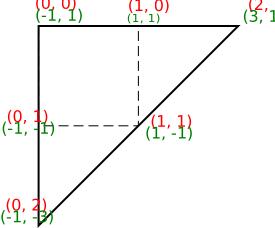
So let's view how the outTextCoord will be calculated using the value of gl_VertexIndex:
- For the first vertex,
gl_VertexIndexwill have the value0, shifting one position to the left will just be also0and performing anANDoperation with2(0b10) will just be also0for thexcoordinate ofoutTextCoord. Theycoordinate will also be0. So we will have (0,0). - For the second vertex,
gl_VertexIndexwill have the value1(0b01), shifting one position will be1(0b10) and performing anANDoperation with2(0b10) will be2(0b10) for thexcoordinate ofoutTextCoord. Theycoordinate will be0. So we will have (2,0). - For the second vertex,
gl_VertexIndexwill have the value2(0b10), shifting one position will be0(0b00) and performing anANDoperation with2(0b10) will be2(0b00) for thexcoordinate ofoutTextCoord. Theycoordinate will be2. So we will have (0,2).
Now, let's review what will be the value of gl_Position will be depending on the value of outTextCoord:
- For the first vertex, we will have (
0,0) foroutTextCoord, sogl_Positionwill be (-1,1,0,1). - For the second vertex, we will have (
2,0) foroutTextCoord, sogl_Positionwill be (3,1,0,1). - For the third vertex, we will have (
0,2) foroutTextCoord, sogl_Positionwill be (-1,-3,0,1).
The next figure shows the resulting triangle with texture coordinates in red and position in green and with dashed line the quad that is within clip space coordinates ([-1,1], [1, -1]). As you can see by drawing a triangle we get a quad within clip space that we will use to generate the post-processing image.
The fragment shader is defined like this:
File: res/shaders/post_frg.glsl
#version 450

layout (constant_id = 0) const int USE_FXAA = 0;

const float GAMMA_CONST = 0.4545;
const float SPAN_MAX = 8.0;
const float REDUCE_MIN = 1.0/128.0;
const float REDUCE_MUL = 1.0/32.0;

layout (location = 0) in vec2 inTextCoord;
layout (location = 0) out vec4 outFragColor;

layout (set = 0, binding = 0) uniform sampler2D inputTexture;

layout(push_constant) uniform pc {
    layout(offset = 0) vec2 screenSize;
} push_constants;

vec4 gamma(vec4 color) {
    return color = vec4(pow(color.rgb, vec3(GAMMA_CONST)), color.a);
}

// Credit: https://mini.gmshaders.com/p/gm-shaders-mini-fxaa
vec4 fxaa(sampler2D tex, vec2 uv) {
    vec2 u_texel = 1.0 / push_constants.screenSize;

	//Sample center and 4 corners
    vec3 rgbCC = texture(tex, uv).rgb;
    vec3 rgb00 = texture(tex, uv+vec2(-0.5,-0.5)*u_texel).rgb;
    vec3 rgb10 = texture(tex, uv+vec2(+0.5,-0.5)*u_texel).rgb;
    vec3 rgb01 = texture(tex, uv+vec2(-0.5,+0.5)*u_texel).rgb;
    vec3 rgb11 = texture(tex, uv+vec2(+0.5,+0.5)*u_texel).rgb;

	//Luma coefficients
    const vec3 luma = vec3(0.299, 0.587, 0.114);
	//Get luma from the 5 samples
    float lumaCC = dot(rgbCC, luma);
    float luma00 = dot(rgb00, luma);
    float luma10 = dot(rgb10, luma);
    float luma01 = dot(rgb01, luma);
    float luma11 = dot(rgb11, luma);

	//Compute gradient from luma values
    vec2 dir = vec2((luma01 + luma11) - (luma00 + luma10), (luma00 + luma01) - (luma10 + luma11));
	//Diminish dir length based on total luma
    float dirReduce = max((luma00 + luma10 + luma01 + luma11) * REDUCE_MUL, REDUCE_MIN);
	//Divide dir by the distance to nearest edge plus dirReduce
    float rcpDir = 1.0 / (min(abs(dir.x), abs(dir.y)) + dirReduce);
	//Multiply by reciprocal and limit to pixel span
    dir = clamp(dir * rcpDir, -SPAN_MAX, SPAN_MAX) * u_texel.xy;

	//Average middle texels along dir line
    vec4 A = 0.5 * (
        texture(tex, uv - dir * (1.0/6.0)) +
        texture(tex, uv + dir * (1.0/6.0)));

	//Average with outer texels along dir line
    vec4 B = A * 0.5 + 0.25 * (
        texture(tex, uv - dir * (0.5)) +
        texture(tex, uv + dir * (0.5)));


	//Get lowest and highest luma values
    float lumaMin = min(lumaCC, min(min(luma00, luma10), min(luma01, luma11)));
    float lumaMax = max(lumaCC, max(max(luma00, luma10), max(luma01, luma11)));

	//Get average luma
	float lumaB = dot(B.rgb, luma);
	//If the average is outside the luma range, using the middle average
    return ((lumaB < lumaMin) || (lumaB > lumaMax)) ? A : B;
}

void main() {
    if (USE_FXAA == 0) {
        outFragColor = gamma(texture(inputTexture, inTextCoord));
        return;
    }

    outFragColor = fxaa(inputTexture, inTextCoord);
    outFragColor = gamma(outFragColor);
}
We use the specialization constant flag that enables / disables FXAA filtering. As you can see the inputTexture descriptor set is the result of the scene rendering stage. FXAA implementation has been obtained from here.
The shaders need to be compiled in the build.zig file:
File: build.zig
pub fn build(b: *std.Build) void {
    ...
    // Shaders
    const shaders = [_]Shader{
        .{ .path = "res/shaders/scn_vtx.glsl", .stage = "vertex" },
        .{ .path = "res/shaders/scn_frg.glsl", .stage = "fragment" },
        .{ .path = "res/shaders/post_vtx.glsl", .stage = "vertex" },
        .{ .path = "res/shaders/post_frg.glsl", .stage = "fragment" },
    };
    ...
}
Changes in Render
We will review now the changes in the Render struct. We first need to create an output attachment to be used as an output by the RenderScn instance and as an input by the RenderPost instance. We will also need to instantiate the RenderPost struct and store it as an attribute.
File: src/eng/render.zig
pub const Render = struct {
    ...
    attColor: Attachment,
    ...
    renderPost: eng.rpst.RenderPost,
    ...
    pub fn cleanup(self: *Render, allocator: std.mem.Allocator) void {
        ...
        self.renderPost.cleanup(&self.vkCtx);
        self.renderScn.cleanup(allocator, &self.vkCtx);
        self.attColor.cleanup(&self.vkCtx);
        ...
    }
    ...
    pub fn create(allocator: std.mem.Allocator, io: std.Io, constants: com.common.Constants, window: sdl3.video.Window) !Render {
        ...
        const attColor = try createColorAttachment(&vkCtx);

        var renderPost = try eng.rpst.RenderPost.create(allocator, io, &vkCtx, constants, &attColor);
        errdefer renderPost.cleanup(&vkCtx);
        var renderScn = try eng.rscn.RenderScn.create(allocator, io, &vkCtx);
        errdefer renderScn.cleanup(allocator, &vkCtx);
        ...
        return .{
            ...
            .attColor = attColor,
            ...
            .renderPost = renderPost,
            ...
        };
    }

    fn createColorAttachment(vkCtx: *const vk.ctx.VkCtx) !Attachment {
        const extent = vkCtx.vkSwapChain.extent;
        const flags = vulkan.ImageUsageFlags{
            .color_attachment_bit = true,
            .sampled_bit = true,
        };
        const attColor = try Attachment.create(
            vkCtx,
            extent.width,
            extent.height,
            COLOR_ATTACHMENT_FORMAT,
            flags,
        );
        return attColor;
    }
    ...
};
We will create the attColor with the same dimensions as the swap chain images although you can play with upscaling / downscaling if you want. We will also update the render function to use the post processing stage:
File: src/eng/render.zig
pub const Render = struct {
    ...
    pub fn render(self: *Render, engCtx: *eng.engine.EngCtx) !void {
        ...
        self.renderMainInit(vkCmdBuff);
        try self.renderScn.render(
            &self.vkCtx,
            engCtx,
            vkCmdBuff,
            &self.attColor,
            &self.modelsCache,
            &self.materialsCache,
            imageIndex,
            self.currentFrame,
        );
        self.renderMainFinish(vkCmdBuff);

        self.renderInitPost(vkCmdBuff, imageIndex);
        try self.renderPost.render(&self.vkCtx, engCtx, vkCmdBuff, imageIndex);
        self.renderFinishPost(vkCmdBuff, imageIndex);

        try vkCmdBuff.end(&self.vkCtx);
        ...
    }
    ...
};
You may have noticed that we have created two new functions renderInitPost and renderFinishPost these will be in charge of the image layout transitions required in the post-processing stage. However, the renderMainInit and the renderMainFinish have also changed so let us start with them:
File: src/eng/render.zig
pub const Render = struct {
    ...
    fn renderMainInit(self: *Render, vkCmd: vk.cmd.VkCmdBuff) void {
        const initBarriers = [_]vulkan.ImageMemoryBarrier2{.{
            .old_layout = vulkan.ImageLayout.undefined,
            .new_layout = vulkan.ImageLayout.color_attachment_optimal,
            .src_stage_mask = .{ .color_attachment_output_bit = true },
            .dst_stage_mask = .{ .color_attachment_output_bit = true },
            .src_access_mask = .{},
            .dst_access_mask = .{ .color_attachment_write_bit = true },
            .src_queue_family_index = vulkan.QUEUE_FAMILY_IGNORED,
            .dst_queue_family_index = vulkan.QUEUE_FAMILY_IGNORED,
            .subresource_range = .{
                .aspect_mask = .{ .color_bit = true },
                .base_mip_level = 0,
                .level_count = vulkan.REMAINING_MIP_LEVELS,
                .base_array_layer = 0,
                .layer_count = vulkan.REMAINING_ARRAY_LAYERS,
            },
            .image = @enumFromInt(@intFromPtr(self.attColor.vkImage.image)),
        }};
        const initDepInfo = vulkan.DependencyInfo{
            .image_memory_barrier_count = initBarriers.len,
            .p_image_memory_barriers = &initBarriers,
        };
        self.vkCtx.vkDevice.deviceProxy.cmdPipelineBarrier2(vkCmd.cmdBuffProxy.handle, &initDepInfo);
    }
    ...
};
In this case we need to transition the image associated with the attColor attribute from an undefined layout (VK_IMAGE_LAYOUT_UNDEFINED) to color_attachment_optimal (VK_IMAGE_LAYOUT_COLOR_ATTACHMENT_OPTIMAL) so it can be used as an output attachment when rendering the scene. We need this to happen prior to executing the fragment shader, so we use the color_attachment_output_bit flag to true as VK_PIPELINE_STAGE_2_COLOR_ATTACHMENT_OUTPUT_BIT (dst_stage_mask). We also need to write to the attachment in this stage, so we set the color_attachment_write_bit flag (VK_ACCESS_2_COLOR_ATTACHMENT_WRITE_BIT) as the dst_access_mask.
The renderMainFinish is defined like this:
File: src/eng/render.zig
pub const Render = struct {
    ...
    fn renderMainFinish(self: *Render, vkCmd: vk.cmd.VkCmdBuff) void {
        const initBarriers = [_]vulkan.ImageMemoryBarrier2{.{
            .old_layout = vulkan.ImageLayout.color_attachment_optimal,
            .new_layout = vulkan.ImageLayout.shader_read_only_optimal,
            .src_stage_mask = .{ .color_attachment_output_bit = true },
            .dst_stage_mask = .{ .fragment_shader_bit = true },
            .src_access_mask = .{ .color_attachment_write_bit = true },
            .dst_access_mask = .{ .shader_read_bit = true },
            .src_queue_family_index = vulkan.QUEUE_FAMILY_IGNORED,
            .dst_queue_family_index = vulkan.QUEUE_FAMILY_IGNORED,
            .subresource_range = .{
                .aspect_mask = .{ .color_bit = true },
                .base_mip_level = 0,
                .level_count = vulkan.REMAINING_MIP_LEVELS,
                .base_array_layer = 0,
                .layer_count = vulkan.REMAINING_ARRAY_LAYERS,
            },
            .image = @enumFromInt(@intFromPtr(self.attColor.vkImage.image)),
        }};
        const initDepInfo = vulkan.DependencyInfo{
            .image_memory_barrier_count = initBarriers.len,
            .p_image_memory_barriers = &initBarriers,
        };
        self.vkCtx.vkDevice.deviceProxy.cmdPipelineBarrier2(vkCmd.cmdBuffProxy.handle, &initDepInfo);
    }
    ...
};
We transition the output attachment (the image associated to the attColor attribute) to the shader_read_only_optimal layout (VK_IMAGE_LAYOUT_SHADER_READ_ONLY_OPTIMAL), since we will be using this attachment as an input in the post-processing stage. In that stage we will not be modifying it. We need this to happen when we reach the fragment_shader_bit stage (VK_PIPELINE_STAGE_2_FRAGMENT_SHADER_BIT) since we will be accessing that image in the post-processing fragment shader. We will need to access it in read-only mode so we set the dst_access_mask to the shader_read_bit (VK_ACCESS_2_SHADER_READ_BIT) flag.
The renderInitPost is defined like this.
File: src/eng/render.zig
pub const Render = struct {
    ...
    fn renderInitPost(self: *Render, vkCmd: vk.cmd.VkCmdBuff, imageIndex: u32) void {
        const initBarriers = [_]vulkan.ImageMemoryBarrier2{.{
            .old_layout = vulkan.ImageLayout.undefined,
            .new_layout = vulkan.ImageLayout.color_attachment_optimal,
            .src_stage_mask = .{ .color_attachment_output_bit = true },
            .dst_stage_mask = .{ .color_attachment_output_bit = true },
            .src_access_mask = .{},
            .dst_access_mask = .{ .color_attachment_write_bit = true },
            .src_queue_family_index = vulkan.QUEUE_FAMILY_IGNORED,
            .dst_queue_family_index = vulkan.QUEUE_FAMILY_IGNORED,
            .subresource_range = .{
                .aspect_mask = .{ .color_bit = true },
                .base_mip_level = 0,
                .level_count = vulkan.REMAINING_MIP_LEVELS,
                .base_array_layer = 0,
                .layer_count = vulkan.REMAINING_ARRAY_LAYERS,
            },
            .image = self.vkCtx.vkSwapChain.imageViews[imageIndex].image,
        }};
        const initDepInfo = vulkan.DependencyInfo{
            .image_memory_barrier_count = initBarriers.len,
            .p_image_memory_barriers = &initBarriers,
        };
        self.vkCtx.vkDevice.deviceProxy.cmdPipelineBarrier2(vkCmd.cmdBuffProxy.handle, &initDepInfo);
    }
};
It is identical to the renderMainInit function in the previous chapters, since we need to transition the output image to be used by the post-processing stage, that is, the swap chain image.
Analogously, the renderFinishPost will be identical as the renderMainFinish function in the previous chapters:
File: src/eng/render.zig
pub const Render = struct {
    ...
    fn renderFinishPost(self: *Render, vkCmd: vk.cmd.VkCmdBuff, imageIndex: u32) void {
        const endBarriers = [_]vulkan.ImageMemoryBarrier2{.{
            .old_layout = vulkan.ImageLayout.color_attachment_optimal,
            .new_layout = vulkan.ImageLayout.present_src_khr,
            .src_stage_mask = .{ .color_attachment_output_bit = true },
            .dst_stage_mask = .{ .bottom_of_pipe_bit = true },
            .src_access_mask = .{ .color_attachment_write_bit = true },
            .dst_access_mask = .{},
            .src_queue_family_index = vulkan.QUEUE_FAMILY_IGNORED,
            .dst_queue_family_index = vulkan.QUEUE_FAMILY_IGNORED,
            .subresource_range = .{
                .aspect_mask = .{ .color_bit = true },
                .base_mip_level = 0,
                .level_count = vulkan.REMAINING_MIP_LEVELS,
                .base_array_layer = 0,
                .layer_count = vulkan.REMAINING_ARRAY_LAYERS,
            },
            .image = self.vkCtx.vkSwapChain.imageViews[imageIndex].image,
        }};
        const endDepInfo = vulkan.DependencyInfo{
            .image_memory_barrier_count = endBarriers.len,
            .p_image_memory_barriers = &endBarriers,
        };
        self.vkCtx.vkDevice.deviceProxy.cmdPipelineBarrier2(vkCmd.cmdBuffProxy.handle, &endDepInfo);
    }
};
Finally, the resize function needs also to be updated to recreate the attColor attribute to have the same size as the swap chain images. We need also to call the resize function over the RenderPost instance:
File: src/eng/render.zig
pub const Render = struct {
    ...
    fn resize(self: *Render, engCtx: *eng.engine.EngCtx) !void {
        ...
        self.attColor.cleanup(&self.vkCtx);
        self.attColor = try createColorAttachment(&self.vkCtx);
        ...
        try self.renderPost.resize(&self.vkCtx, &self.attColor);
    }
    ...
};
Final changes
We need to update the Constants struct to have the new configuration parameter to enable / disable FXAA:
File: src/eng/com/common.zig
pub const Constants = struct {
    ...
    fxaa: bool,
    ...
    pub fn load(allocator: std.mem.Allocator) !Constants {
        ...
        const constants = Constants{
            ...
            .fxaa = tmp.fxaa,
            ...
        };
    }
    ...
};
Remember to add the new configuration parameter to the res/cfg/cfg.toml file:
File: res/cfg/cfg.toml
...
fxaa=true
...
There is also an important change that we need to perform. When setting the surface format, previously we tended to use the b8g8r8a8_srgb (VK_FORMAT_B8G8R8A8_SRGB) format which performed automatic gamma correction automatically. Now, we will be doing gamma correction manually in the post-processing stage (this will prevent having issues when using other stages, such as GUI drawing, that apply also gamma correction). Therefore, we need to change that format to this one: b8g8r8a8_unorm (VK_FORMAT_B8G8R8A8_UNORM):
File: src/eng/vk/vkSurface.zig
pub const VkSurface = struct {
    ...
    pub fn getSurfaceFormat(self: *const VkSurface, allocator: std.mem.Allocator, vkInstance: vk.inst.VkInstance, vkPhysDevice: vk.phys.VkPhysDevice) !vulkan.SurfaceFormatKHR {
        const preferred = vulkan.SurfaceFormatKHR{
            .format = .b8g8r8a8_unorm,
            .color_space = .srgb_nonlinear_khr,
        };
        ....
    }
    ...
};