Chapter 07 - Going 3D
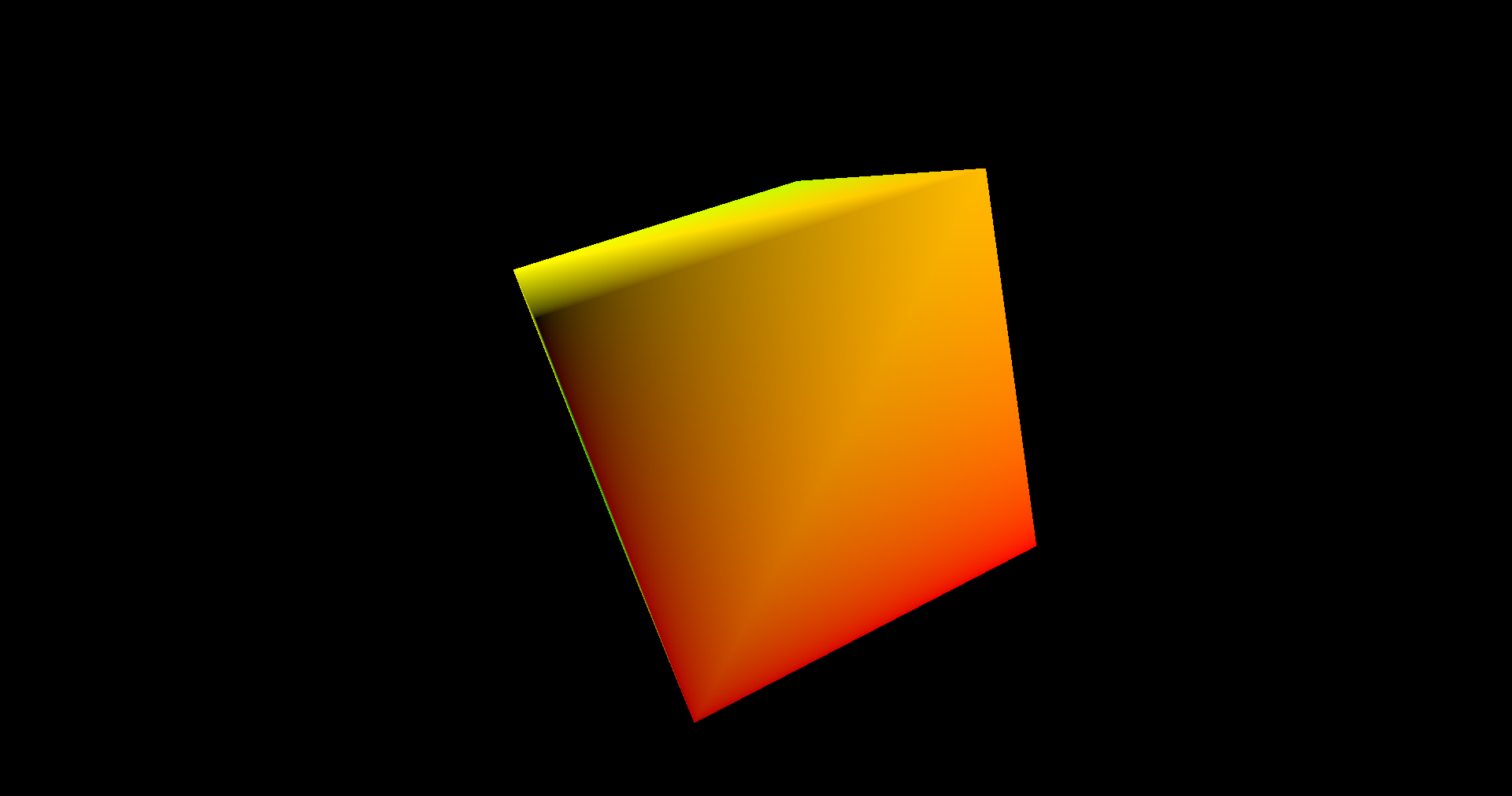
In this chapter we will be rendering a 3D model, a spinning cube. Although our models did already have a z-coordinate, the output attachments we are using only deal with colors, depth values were not handled at all. We need to define a new attachment to store depth information, a depth image. In addition to that, we will add support for window resizing. You can find the complete source code for this chapter here.
We will be using the zmath so you will need to include it in the build.zig.zon file by executing: zig fetch --save https://github.com/zig-gamedev/zmath/archive/9e42b04a24c970a297b365f3d3022f92dbf3219d.tar.gz. In addition, you will need to include it in the build.zig file:
File: build.zig
pub fn build(b: *std.Build) void {
    ...
    // Zmath
    const zmathDep = b.dependency("zmath", .{});
    const zmath = zmathDep.module("root");
    exe.root_module.addImport("zm", zmath);
    ..
    eng.addImport("zmath", zmath);
    ...
}
Depth Image
The first thing we must do is create a depth image. In the case of the swap chain, images were already there, we just used an image view to access them. This case is different, we need to allocate the images by ourselves. In order to handle that task we will create a new struct named VkImage. Since image creation parameters can be lengthy, we will first create a struct named VkImageData, which will act as a build helper struct using a fluent style API. All this code will be located in a new file src/eng/vk/VkImage.zig. Remember to include it in the mod.zig: pub const img = @import("vkImage.zig");.
File: src/eng/vk/VkImage.zig
const vk = @import("mod.zig");
const vulkan = @import("vulkan");

pub const VkImageData = struct {
    arrayLayers: u32 = 1,
    format: vulkan.Format = vulkan.Format.r8g8b8a8_srgb,
    height: u32,
    mipLevels: u32 = 1,
    sampleCount: vulkan.SampleCountFlags = vulkan.SampleCountFlags.fromInt(1),
    tiling: vulkan.ImageTiling = vulkan.ImageTiling.optimal,
    usage: vulkan.ImageUsageFlags,
    width: u32,
};
The attributes for creating an image are:
widthandheight: The size of the image.format: Describes the format of the texel blocks that compose the image.usage: Describes the intended usage that this image will have.mipLevels: Describes the levels of detail available for this image (more on this in later chapters).sampleCount: Specifies the number of texels per sample (more on this in later chapters).arrayLayers: Specifies the number of layers of an image (more on this in later chapters).tiling: Specify the tiling arrangement of the texel blocks of the image in memory.
The VkImage struct starts like this:
File: src/eng/vk/VkImage.zig
pub const VkImage = struct {
    image: vulkan.Image,
    width: u32,
    height: u32,
    memory: vulkan.DeviceMemory,

    pub fn create(vkCtx: *const vk.ctx.VkCtx, vkImageData: VkImageData) !VkImage {
        const createInfo = vulkan.ImageCreateInfo{
            .image_type = vulkan.ImageType.@"2d",
            .format = vkImageData.format,
            .extent = .{
                .width = vkImageData.width,
                .height = vkImageData.height,
                .depth = 1,
            },
            .mip_levels = vkImageData.mipLevels,
            .array_layers = vkImageData.arrayLayers,
            .samples = vkImageData.sampleCount,
            .usage = vkImageData.usage,
            .sharing_mode = vulkan.SharingMode.exclusive,
            .initial_layout = vulkan.ImageLayout.undefined,
            .tiling = vkImageData.tiling,
        };
        ...
    }
    ...
};
It provides a create function to instantiate it which first creates a ImageCreateInfo structure whose attributes are:
image_type: It specifies the dimensions of the image. In our case we will be using regular 2D dimensions, so we set to the valuevulkan.ImageType.@"2d"(VK_IMAGE_TYPE_2D). Three-dimensional imagesvulkan.ImageType.@"3d"(VK_IMAGE_TYPE_3D) are like a set of slices of 2D textures and are used for volumetric effects or for scientific or medical visualizations (like MRIs). One dimension textures are defined by the valuevulkan.ImageType.@"1d"(VK_IMAGE_TYPE_1D).format: Described above, format of the texel blocks that compose the image.extent: It specifies the size of the image. In this case, the structure needs to support 3D images, so it includes the depth. For 2D images we just set it to1.mip_levels: Already described in thecreatefunction's parameters description.array_layers: Images can be arrays of layers. This is different from a 3D image. A 3D image contains data that is referred to the three axis. An array of layers is a set of 2D images indexed by a layer number.samples: Already described inVkImageData(sampleCount).usage: Already described inVkImageData.sharing_mode: It specifies if this resource will be shared by more than a single queue family at a time (vulkan.SharingMode.concurrentequivalent toVK_SHARING_MODE_CONCURRENT) or not (vulkan.SharingMode.exclusiveequivalent toVK_SHARING_MODE_EXCLUSIVE).initial_layout: This is the initial layout of the image. We just set it tovulkan.ImageLayout.undefined(VK_IMAGE_LAYOUT_UNDEFINED). If a transition to another layout is required it will need to be done later on. (This depends on the use case for the image, this is why we do not perform the transition here).tiling: It specifies the tiling arrangement of the texel blocks in memory. In our case, we chose to use the optimal value, so that the texels are laid out in the best format for each GPU.
Now we can create the image by invoking the createImage Vulkan function:
File: src/eng/vk/VkImage.zig
pub const VkImage = struct {
    ...
    pub fn create(vkCtx: *const vk.ctx.VkCtx, vkImageData: VkImageData) !VkImage {
        ...
        const image = try vkCtx.vkDevice.deviceProxy.createImage(&createInfo, null);
        ...
    }
    ...
};
After that we need to allocate the memory associated with that image. As in the case of buffers, that image is just a handle, we need to manually allocate the memory that will host the contents for the image by ourselves. The first step is to get the memory requirements by calling the getImageMemoryRequirements function:
File: src/eng/vk/VkImage.zig
pub const VkImage = struct {
    ...
    pub fn create(vkCtx: *const vk.ctx.VkCtx, vkImageData: VkImageData) !VkImage {
        ...
        const memReqs = vkCtx.vkDevice.deviceProxy.getImageMemoryRequirements(image);
        ...
    }
    ...
};
With that information we can populate the MemoryAllocateInfo structure which contains the information to perform the memory allocation.
File: src/eng/vk/VkImage.zig
pub const VkImage = struct {
    ...
    pub fn create(vkCtx: *const vk.ctx.VkCtx, vkImageData: VkImageData) !VkImage {
        ...
        const allocInfo = vulkan.MemoryAllocateInfo{
            .allocation_size = memReqs.size,
            .memory_type_index = try vkCtx.findMemoryTypeIndex(memReqs.memory_type_bits, vulkan.MemoryPropertyFlags.fromInt(0)),
        };
        ...
    }
    ...
};
Again, the code is similar to the one used with the buffers, once we have obtained the requirements, we set the memory size and select the adequate memory type index (obtained by calling the findMemoryTypeIndex from the VkCtx structs). After that we can finally allocate the memory and bind it to the image:
File: src/eng/vk/VkImage.zig
pub const VkImage = struct {
    ...
    pub fn create(vkCtx: *const vk.ctx.VkCtx, vkImageData: VkImageData) !VkImage {
        ...
        const memory = try vkCtx.vkDevice.deviceProxy.allocateMemory(&allocInfo, null);

        try vkCtx.vkDevice.deviceProxy.bindImageMemory(image, memory, 0);

        return .{
            .image = image,
            .width = vkImageData.width,
            .height = vkImageData.height,
            .memory = memory,
        };
        ...
    }
};
The only missing function of this struct is the cleanup one to free resources.
File: src/eng/vk/VkImage.zig
pub const VkImage = struct {
    ...
    pub fn cleanup(self: *const VkImage, vkCtx: *const vk.ctx.VkCtx) void {
        vkCtx.vkDevice.deviceProxy.destroyImage(self.image, null);
        vkCtx.vkDevice.deviceProxy.freeMemory(self.memory, null);
    }
};
Attachment
In order to use the depth image we will also need to setup an VkImageView. Both the depth VkImage and the associated VkImageView will constitute an attachment, a depth attachment. Since we will handle both objects together, we will create a new struct, named Attachment, that will handle their creation and will be handy for next chapters. The definition is quite simple (it is included in the render.zig file):
File: src/eng/render.zig
pub const Attachment = struct {
    vkImage: vk.img.VkImage,
    vkImageView: vk.imv.VkImageView,

    pub fn create(vkCtx: *const vk.ctx.VkCtx, width: u32, height: u32, format: vulkan.Format, usage: vulkan.ImageUsageFlags) !Attachment {
        var currUsage = usage;
        currUsage.sampled_bit = true;
        const vkImageData = vk.img.VkImageData{
            .format = format,
            .width = width,
            .height = height,
            .usage = currUsage,
        };

        const vkImage = try vk.img.VkImage.create(vkCtx, vkImageData);
        errdefer vkImage.cleanup(vkCtx);
        var aspectMask: vulkan.ImageAspectFlags = vulkan.ImageAspectFlags{ .color_bit = true };
        if (usage.depth_stencil_attachment_bit) {
            aspectMask.color_bit = false;
            aspectMask.depth_bit = true;
        }
        const imageViewData = vk.imv.VkImageViewData{
            .format = format,
            .aspectmask = aspectMask,
        };
        const vkImageView = try vk.imv.VkImageView.create(vkCtx.vkDevice, vkImage.image, imageViewData);

        return .{
            .vkImage = vkImage,
            .vkImageView = vkImageView,
        };
    }

    pub fn cleanup(self: *Attachment, vkCtx: *const vk.ctx.VkCtx) void {
        self.vkImageView.cleanup(vkCtx.vkDevice);
        self.vkImage.cleanup(vkCtx);
    }
};
We just create and image and the associated image view. Depending on the type of image (color or depth image), we set up the aspect mask accordingly.
Changing vertices structure
In the previous chapter, we defined the structure of our vertices, which basically stated that our vertices were composed by x, y and z positions. Therefore, we would not need anything more to display 3D models. However, displaying a 3D model just using a single color (without shadows or light effects), makes difficult to verify if the model is being loaded property. So, we will add extra components that we will reuse in next chapters, we will add texture coordinates. Although we will not be handling textures in this chapter, we can use those components to pass some color information (at lest for two color channels). We need to modify the VtxBuffDesc struct in this way:
File: src/eng/renderScn.zig
pub const VtxBuffDesc = struct {
    pub const binding_description = vulkan.VertexInputBindingDescription{
        .binding = 0,
        .stride = @sizeOf(VtxBuffDesc),
        .input_rate = .vertex,
    };

    pub const attribute_description = [_]vulkan.VertexInputAttributeDescription{
        .{
            .binding = 0,
            .location = 0,
            .format = .r32g32b32_sfloat,
            .offset = @offsetOf(VtxBuffDesc, "pos"),
        },
        .{
            .binding = 0,
            .location = 1,
            .format = .r32g32_sfloat,
            .offset = @offsetOf(VtxBuffDesc, "textCoords"),
        },
    };

    pos: [3]f32,
    textCoords: [2]f32,
};
The number of attributes of each vertex will now be two, one for the position components and another one for the texture coordinates. The attribute definition itself is quite similar to the one used for the positions, in this case, the size will be for two floats.
Scene
If we are going to represent 3D scenes, we need to project from the 3D world into a 2D space (the screen). We will need to use a perspective projection matrix in order to avoid distortions and to represent far away objects smaller than closer ones. We will create a new struct to model world information in a file named scene.zig (located in src/eng and that shall be added to mod.zig: pub const scn = @import("scene.zig");). It will include a new struct named ProjData that which is defined like this:
File: src/eng/scene.zig
const com = @import("com");
const eng = @import("mod.zig");
const std = @import("std");
const zm = @import("zmath");
const log = std.log.scoped(.eng);

pub const ProjData = struct {
    projMatrix: zm.Mat = zm.identity(),
    zoomFactor: f32 = 1.0,
    fov: f32 = 0.0,
    near: f32 = 0.0,
    far: f32 = 0.0,

    pub fn update(self: *ProjData, fov: f32, near: f32, far: f32, width: f32, height: f32) void {
        self.fov = fov;
        self.near = near;
        self.far = far;

        const aspect = width / height;

        const tan_half_fovy = @tan(fov * 0.5);

        const x_scale = 1.0 / (aspect * tan_half_fovy);
        const y_scale = 1.0 / tan_half_fovy;
        const z_scale = far / (near - far);
        const w_scale = (near * far) / (near - far);

        self.projMatrix = zm.Mat{
            zm.f32x4(x_scale, 0.0, 0.0, 0.0),
            zm.f32x4(0.0, y_scale, 0.0, 0.0),
            zm.f32x4(0.0, 0.0, z_scale, -1.0),
            zm.f32x4(0.0, 0.0, w_scale, 0.0),
        };
    }
};
We will create a 4x4 matrix projMatrix that will be created as a projection matrix. It requires the following parameters:
fov: Field of view in radians.near: Z coordinate of the near plane.far: Z coordinates of the far plane.width: Width of the render area.height: Height of the render area.
This struct will be included in a Camera struct (defined in the same file):
File: src/eng/scene.zig
pub const Camera = struct {
    projData: ProjData,

    pub fn create() Camera {
        const projData = ProjData{};
        return .{ .projData = projData };
    }
};
This structure will later hold the view matrix. The parameters of the perspective matrix can be configured in the cfg.toml file, so we need to update the Constants struct:
File: src/eng/com/common.zig
pub const Constants = struct {
    fov: f32,
    ...
    zFar: f32,
    zNear: f32,

    pub fn load(allocator: std.mem.Allocator, io: std.Io) !Constants {
        ...
        const constants = Constants{
            .fov = tmp.fov * std.math.pi / 180.0,
            .gpu = try allocator.dupe(u8, tmp.gpu),
            .swapChainImages = tmp.swapChainImages,
            .ups = tmp.ups,
            .validation = tmp.validation,
            .vsync = tmp.vsync,
            .zFar = tmp.zFar,
            .zNear = tmp.zNear,
        };
       ...
    }
    ...
};
Remember to include the parameters in the cfg.toml file:
File: res/cfg/cfg.toml
fov=60
...
zFar=50.0
zNear=1.0
We are also going to introduce a new concept for the engine that will allow to define game entities and use the same VkModel to render multiple elements. Instead of directly rendering models, we will have entities which have some properties, such as their scale, position and rotation and will be associated to a model. They can model a player, NPCs or scene objects and will be managed by a struct named Entity. It will be included in a the src/eng/entity.zig (Remember to include it in mod.zig file: pub const ent = @import("entity.zig");) and it is defined like this:
File: src/eng/entity.zig
const eng = @import("mod.zig");
const std = @import("std");
const zm = @import("zmath");

pub const Entity = struct {
    id: []const u8,
    modelId: []const u8,
    pos: zm.F32x4,
    modelMatrix: zm.Mat,
    rotation: zm.Quat,
    scale: f32,

    pub fn create(allocator: std.mem.Allocator, id: []const u8, modelId: []const u8) !*Entity {
        const ownedId = try allocator.dupe(u8, id);
        errdefer allocator.free(ownedId);
        var entity = try allocator.create(Entity);
        errdefer allocator.destroy(entity);
        entity.id = ownedId;
        entity.modelId = try allocator.dupe(u8, modelId);
        entity.pos = zm.f32x4(0, 0, 0, 1);
        entity.modelMatrix = zm.identity();
        entity.rotation = zm.f32x4(0, 0, 0, 1);
        entity.scale = 1.0;

        entity.update();
        return entity;
    }

    pub fn cleanup(self: *Entity, allocator: std.mem.Allocator) void {
        allocator.free(self.id);
        allocator.free(self.modelId);
        allocator.destroy(self);
    }

    pub fn setPos(self: *Entity, x: f32, y: f32, z: f32) void {
        self.pos[0] = x;
        self.pos[1] = y;
        self.pos[2] = z;
    }

    pub fn update(self: *Entity) void {
        const translation = zm.translation(self.pos[0], self.pos[1], self.pos[2]);
        const scaling = zm.scaling(self.scale, self.scale, self.scale);
        const rotation = zm.quatToMat(self.rotation);
        self.modelMatrix = zm.mul(zm.mul(scaling, rotation), translation);
    }
};
Each Entity shall have an identifier which should be unique. It is also linked to the model that will be used to render it through the modelId attribute. An Entity will also have a position, a rotation (modeled using a quaternion) and a scale. With all that information we are able to create a model matrix by calling the update. The update should be called each time the position, rotation or scale changes.
Now we can setup the required infrastructure to put the ProjData and Entity structs into work. We will add this to a new struct named Scene (defined inside the scene.zig file):
File: src/eng/scene.zig
pub const Scene = struct {
    camera: Camera,
    entitiesMap: std.StringHashMap(*eng.ent.Entity),

    pub fn addEntity(self: *Scene, entity: *eng.ent.Entity) !void {
        try self.entitiesMap.put(entity.id, entity);
    }

    pub fn create(allocator: std.mem.Allocator) !Scene {
        const camera = Camera.create();
        const entitiesMap = std.StringHashMap(*eng.ent.Entity).init(allocator);

        return .{
            .camera = camera,
            .entitiesMap = entitiesMap,
        };
    }

    pub fn cleanup(self: *Scene, allocator: std.mem.Allocator) void {
        var iter = self.entitiesMap.valueIterator();
        while (iter.next()) |entityRef| {
            const entity = entityRef.*;
            entity.cleanup(allocator);
        }
        self.entitiesMap.deinit();
    }
};
The create function creates an instance of the Camera and a StringHashMap that will store entity references indexed by their identifiers. The other functions will be used to add entities and the cleanup one.
Enable depth testing
We also need to modify the pipeline to actually use the depth image for depth testing. Since we may have pipelines that do not use depth testing at all, we will indicate if it's required in the VkPipelineCreateInfo struct:
File: src/eng/vk/VkPipeline.zig
pub const VkPipelineCreateInfo = struct {
    ...
    depthFormat: vulkan.Format = vulkan.Format.undefined,
    ...
    pushConstants: ?[]const vulkan.PushConstantRange,
    ...
};
You may also see that there is another attribute, named pushConstants. We will explain its usage later on. Now, in the VkPipelinecreate function we need to enable the depth stencil state if the depthFormat attribute from the VkPipelineCreateInfo struct is not equal to vulkan.Format.undefined (VK_FORMAT_UNDEFINED).
File: src/eng/vk/VkPipeline.zig
pub const VkPipeline = struct {
    ...
    pub fn create(allocator: std.mem.Allocator, vkCtx: *const vk.ctx.VkCtx, createInfo: *const VkPipelineCreateInfo) !VkPipeline {
        ...
        const renderCreateInfo = vulkan.PipelineRenderingCreateInfo{
            .color_attachment_count = 1,
            .p_color_attachment_formats = &formats,
            .view_mask = 0,
            .depth_attachment_format = createInfo.depthFormat,
            .stencil_attachment_format = vulkan.Format.undefined,
        };
        ...
        const depthState = vulkan.PipelineDepthStencilStateCreateInfo{
            .flags = .{},
            .depth_test_enable = vulkan.Bool32.true,
            .depth_write_enable = vulkan.Bool32.true,
            .depth_compare_op = .less_or_equal,
            .depth_bounds_test_enable = vulkan.Bool32.false,
            .front = .{
                .fail_op = .keep,
                .pass_op = .keep,
                .depth_fail_op = .keep,
                .compare_op = .never,
                .compare_mask = 0,
                .write_mask = 0,
                .reference = 0,
            },
            .back = .{
                .fail_op = .keep,
                .pass_op = .keep,
                .depth_fail_op = .keep,
                .compare_op = .never,
                .compare_mask = 0,
                .write_mask = 0,
                .reference = 0,
            },
            .stencil_test_enable = vulkan.Bool32.false,
            .min_depth_bounds = 0.0,
            .max_depth_bounds = 0.0,
        };
        ...
    }
    ...
};
We need to instantiate a VkPipelineCreateInfo structure which has the following attributes:
depth_test_enable: It controls if depth testing is enabled or not (when rendering it is used to discard fragments which are behind already rendered fragments, values which do not fulfill the test operation will be discarded). This is what we need, so we set it totrue.depth_write_enable: This controls if depth writing to the depth attachment is enabled or not. You could enable depth testing but not want to write depth values, for example if the depth image used as a depth attachment has already been created by another task. This is not our case, we want the depth image to be written while rendering, so we set it totrue.depth_compare_op: It defines the operator used for the depth test. In our case, we use theless_or_equal(VK_COMPARE_OP_LESS_OR_EQUAL), which means that only depth values that are less or equal than the existing value will pass the test.depth_bounds_test_enable: This controls if depth values are also tested against a minimum and a maximum bound. This is used to avoid rendering far away objects, that may not be hidden by nearest objects but that it is useless to render. We are not using this now, so we set it tofalse.stencil_test_enable: This enables stencil test. Since we are not using stencils at this moment, we set it to false.
This structure will be used later on while creating the pipeline:
File: src/eng/vk/VkPipeline.zig
pub const VkPipeline = struct {
    ...
    pub fn create(allocator: std.mem.Allocator, vkCtx: *const vk.ctx.VkCtx, createInfo: *const VkPipelineCreateInfo) !VkPipeline {
        ...
        const gpci = vulkan.GraphicsPipelineCreateInfo{
            .flags = .{},
            .stage_count = @intCast(createInfo.modulesInfo.len),
            .p_stages = pssci.ptr,
            .p_vertex_input_state = &pvisci,
            .p_input_assembly_state = &piasci,
            .p_tessellation_state = null,
            .p_viewport_state = &pvsci,
            .p_rasterization_state = &prsci,
            .p_multisample_state = &pmsci,
            .p_depth_stencil_state = if (createInfo.depthFormat != vulkan.Format.undefined) &depthState else null,
            .p_color_blend_state = &pcbsci,
            .p_dynamic_state = &pdsci,
            .layout = pipelineLayout,
            .subpass = 0,
            .base_pipeline_handle = .null_handle,
            .base_pipeline_index = -1,
            .p_next = @constCast(&renderCreateInfo),
        };
        ....
    }
    ...
};
Passing data to the shaders
We have already talked about defining a projection matrix and creating the model matrices, but we have not addressed how to pass that data to the shaders. In OpenGL this is usually done using uniform buffers, but in Vulkan we have other options also. Vulkan defines several ways to pass this varying data to the shaders, including uniforms. However, using uniforms requires the definition of new concepts such as descriptor pools and descriptor sets, which require careful explanation. Nevertheless, Vulkan introduces a new way to pass data to the buffers which can be used for small sets of data and which is quite easy to set up. These are the so called push constants.
Push constants are small sets of data that can be set while recording command buffers. They do not require creating an underlying buffer nor they require the descriptors used in uniforms. They are a simple mechanism to push data to the shaders in a supposed fast way. How fast they are depends on the hardware. The mechanisms used by the GPU to handle this data are opaque to us, so different vendors choose different strategies which in the end affects the performance. The maximum amount of data that we can push is very limited: 128 bytes. This is the minimum required by the specification, some GPUs extend that limit, but, in our case, we will work using that limit.
As it has been said before, push constants are intended to pass small amounts of data that can change very frequently. As you can see, 128 bytes is quite small, but we can store there the model matrices for each entity (64 bytes). This will be the regular use case for push constants here. But, we also need to pass the projection matrix (another 64 bytes). In later chapters we will pass that information through uniforms. However, since we have not yet coded the mechanisms required to support uniforms, we will use the available space of push constants to pass also this information. Keep in mind that this is a temporary solution, we will change that in next chapters.
We already modified the VkPipelineCreateInfo struct to include push constants (by adding the pushConstants attribute). We now need to use this information in the VkPipeline struct:
File: src/eng/vk/VkPipeline.zig
pub const VkPipeline = struct {
    ...
    pub fn create(allocator: std.mem.Allocator, vkCtx: *const vk.ctx.VkCtx, createInfo: *const VkPipelineCreateInfo) !VkPipeline {
        ...
        const pipelineLayout = try vkCtx.vkDevice.deviceProxy.createPipelineLayout(&.{
            .flags = .{},
            .set_layout_count = 0,
            .p_set_layouts = null,
            .push_constant_range_count = if (createInfo.pushConstants) |pc| @as(u32, @intCast(pc.len)) else 0,
            .p_push_constant_ranges = if (createInfo.pushConstants) |pcs| pcs.ptr else null,
        }, null);
        ...
    }
    ...
};
Putting it all up together
We have coded all the elements required to support the proper rendering of 3D models and pass transformation matrices to the shaders. We now can use them and also support another missing feature: resizing support. Let's start with the changes required in the Render struct. We will calculate the projection matrix in the init function. We will also add support for window resizing. When a window is resized, we need to update the projection matrix and recreate some Vulkan structures.
File: src/eng/render.zig
pub const Render = struct {
    ...
    mustResize: bool,

    pub fn create(allocator: std.mem.Allocator, io: std.Io, constants: com.common.Constants, window: sdl3.video.Window) !Render {
        ...
        return .{
            ...
            .mustResize = false,
            ...
        };
    }

    pub fn init(self: *Render, engCtx: *eng.engine.EngCtx, initData: *const eng.engine.InitData) !void {
        const constants = engCtx.constants;
        const extent = self.vkCtx.vkSwapChain.extent;
        engCtx.scene.camera.projData.update(
            constants.fov,
            constants.zNear,
            constants.zFar,
            @as(f32, @floatFromInt(extent.width)),
            @as(f32, @floatFromInt(extent.height)),
        );
        try self.modelsCache.init(engCtx.allocator, &self.vkCtx, &self.cmdPools[0], self.queueGraphics, initData);
    }

    pub fn render(self: *Render, engCtx: *eng.engine.EngCtx) !void {
        const fence = self.fences[self.currentFrame];
        try fence.wait(&self.vkCtx);

        const vkCmdPool = self.cmdPools[self.currentFrame];
        try vkCmdPool.reset(&self.vkCtx);

        const vkCmdBuff = self.cmdBuffs[self.currentFrame];
        try vkCmdBuff.begin(&self.vkCtx);

        const res = try self.vkCtx.vkSwapChain.acquire(self.vkCtx.vkDevice, self.semsPresComplete[self.currentFrame]);
        if (engCtx.wnd.resized or self.mustResize or res == .recreate) {
            try vkCmdBuff.end(&self.vkCtx);
            try self.resize(engCtx);
            return;
        }
        const imageIndex = res.ok;

        self.renderMainInit(vkCmdBuff, imageIndex);

        try self.renderScn.render(&self.vkCtx, engCtx, vkCmdBuff, &self.modelsCache, imageIndex);

        self.renderMainFinish(vkCmdBuff, imageIndex);

        try vkCmdBuff.end(&self.vkCtx);

        try self.submit(&vkCmdBuff, imageIndex);

        self.mustResize = !self.vkCtx.vkSwapChain.present(self.vkCtx.vkDevice, self.queuePresent, self.semsRenderComplete[imageIndex], imageIndex);

        self.currentFrame = (self.currentFrame + 1) % com.common.FRAMES_IN_FLIGHT;
    }
    ...
    fn resize(self: *Render, engCtx: *eng.engine.EngCtx) !void {
        const allocator = engCtx.allocator;
        const size = try engCtx.wnd.getSize();
        if (size.width == 0 and size.height == 0) {
            return;
        }
        self.mustResize = false;
        self.vkCtx.vkDevice.wait() catch |err| log.err("Device wait failed in cleanup: {}", .{err});
        try self.vkCtx.resize(allocator, engCtx.wnd.window);

        cleanupSemphs(allocator, &self.vkCtx, self.semsRenderComplete, self.semsRenderComplete.len);
        cleanupSemphs(allocator, &self.vkCtx, self.semsPresComplete, self.semsPresComplete.len);

        const semsRenderComplete = try allocator.alloc(vk.sync.VkSemaphore, self.vkCtx.vkSwapChain.imageViews.len);
        var initSempshRender: usize = 0;
        errdefer cleanupSemphs(allocator, &self.vkCtx, semsRenderComplete, initSempshRender);
        for (semsRenderComplete) |*sem| {
            sem.* = try vk.sync.VkSemaphore.create(&self.vkCtx);
            initSempshRender += 1;
        }

        const semsPresComplete = try allocator.alloc(vk.sync.VkSemaphore, com.common.FRAMES_IN_FLIGHT);
        var initSempshPres: usize = 0;
        errdefer cleanupSemphs(allocator, &self.vkCtx, semsPresComplete, initSempshPres);
        for (semsPresComplete) |*sem| {
            sem.* = try vk.sync.VkSemaphore.create(&self.vkCtx);
            initSempshPres += 1;
        }

        self.semsPresComplete = semsPresComplete;
        self.semsRenderComplete = semsRenderComplete;

        const constants = engCtx.constants;
        const extent = self.vkCtx.vkSwapChain.extent;
        engCtx.scene.camera.projData.update(
            constants.fov,
            constants.zNear,
            constants.zFar,
            @as(f32, @floatFromInt(extent.width)),
            @as(f32, @floatFromInt(extent.height)),
        );

        try self.renderScn.resize(&self.vkCtx, engCtx);
    }
    ...
};
In the render function, we check if the engCtx.wnd.resized flag has been set to true or if the image acquisition fails. If this happens, this will mean that we need to handle window resizing and call the resize function. You may also notice that the RenderScn struct now receives an instance of EngCtx also.
The new resize function first checks if the window size is equal to zero. This will mean that the window is minimized and makes no sense to continue. After that, it resets the mustResize flag and waits for the device to be idle, calls resize over VkCtx instance and cleans up the synchronization semaphores and creates new ones. It also updates the projection matrix and calls the resize function over RenderScn struct.
Let's view the changes in the VkCtx struct:
File: src/eng/vk/VkCtx.zig
pub const VkCtx = struct {
    ...
    pub fn resize(self: *VkCtx, allocator: std.mem.Allocator, window: sdl3.video.Window) !void {
        const numImages = @as(u8, @intCast(self.vkSwapChain.imageViews.len));
        const vsync = self.vkSwapChain.vsync;
        self.vkSwapChain.cleanup(allocator, self.vkDevice);
        self.vkSurface.cleanup(self.vkInstance);
        var vkSurface = try vk.surf.VkSurface.create(window, self.vkInstance);
        errdefer vkSurface.cleanup(self.vkInstance);
        const vkSwapChain = try vk.swap.VkSwapChain.create(
            allocator,
            window,
            self.vkInstance,
            self.vkPhysDevice,
            self.vkDevice,
            vkSurface,
            numImages,
            vsync,
        );
        self.vkSurface = vkSurface;
        self.vkSwapChain = vkSwapChain;
    }
}
When resizing we just clean up the swap chain and surface and recreate them again.
Let's review the changes in the RenderScn struct:
File: src/eng/renderScn.zig
...
const zm = @import("zmath");
...
const PushConstantsVtx = struct {
    modelMatrix: zm.Mat,
    projMatrix: zm.Mat,
};

const DEPTH_FORMAT = vulkan.Format.d16_unorm;

pub const RenderScn = struct {
    depthAttachments: []eng.rend.Attachment,
    vkPipeline: vk.pipe.VkPipeline,

    pub fn create(allocator: std.mem.Allocator, io: std.Io, vkCtx: *const vk.ctx.VkCtx) !RenderScn {
        const depthAttachments = try createDepthAttachments(allocator, vkCtx);

        // Shader modules
        var arena = std.heap.ArenaAllocator.init(std.heap.page_allocator);
        defer arena.deinit();
        const vertCode align(@alignOf(u32)) = try com.utils.loadFile(arena.allocator(), io, "res/shaders/scn_vtx.glsl.spv");
        const vert = try vkCtx.vkDevice.deviceProxy.createShaderModule(&.{
            .code_size = vertCode.len,
            .p_code = @ptrCast(@alignCast(vertCode)),
        }, null);
        defer vkCtx.vkDevice.deviceProxy.destroyShaderModule(vert, null);

        const fragCode align(@alignOf(u32)) = try com.utils.loadFile(arena.allocator(), io, "res/shaders/scn_frg.glsl.spv");
        const frag = try vkCtx.vkDevice.deviceProxy.createShaderModule(&.{
            .code_size = fragCode.len,
            .p_code = @ptrCast(@alignCast(fragCode)),
        }, null);
        defer vkCtx.vkDevice.deviceProxy.destroyShaderModule(frag, null);

        const modulesInfo = try allocator.alloc(vk.pipe.ShaderModuleInfo, 2);
        modulesInfo[0] = .{ .module = vert, .stage = .{ .vertex_bit = true } };
        modulesInfo[1] = .{ .module = frag, .stage = .{ .fragment_bit = true } };
        defer allocator.free(modulesInfo);

        // Push constants
        const pushConstants = [_]vulkan.PushConstantRange{.{
            .stage_flags = vulkan.ShaderStageFlags{ .vertex_bit = true },
            .offset = 0,
            .size = @sizeOf(PushConstantsVtx),
        }};

        // Pipeline
        const vkPipelineCreateInfo = vk.pipe.VkPipelineCreateInfo{
            .colorFormat = vkCtx.vkSwapChain.surfaceFormat.format,
            .depthFormat = DEPTH_FORMAT,
            .modulesInfo = modulesInfo,
            .pushConstants = pushConstants[0..],
            .useBlend = false,
            .vtxBuffDesc = .{
                .attribute_description = @constCast(&VtxBuffDesc.attribute_description)[0..],
                .binding_description = VtxBuffDesc.binding_description,
            },
        };
        var vkPipeline = try vk.pipe.VkPipeline.create(allocator, vkCtx, &vkPipelineCreateInfo);
        errdefer vkPipeline.cleanup(vkCtx);

        return .{
            .depthAttachments = depthAttachments,
            .vkPipeline = vkPipeline,
        };
    }
    ...
};
In the push constants ranges, we are saying that we will be using push constants in the vertex shader (vertex_bit which is equivalent to VK_SHADER_STAGE_VERTEX_BIT), that the range will start at offset 0 in the buffer, and it will have the size of PushConstantsVtx struct (two 4x4 matrices).
The cleanup function also needs to be modified to free the new resources:
File: src/eng/renderScn.zig
pub const RenderScn = struct {
    ...
    pub fn cleanup(self: *RenderScn, allocator: std.mem.Allocator, vkCtx: *const vk.ctx.VkCtx) void {
        self.vkPipeline.cleanup(vkCtx);
        for (self.depthAttachments) |*depthAttachment| {
            depthAttachment.cleanup(vkCtx);
        }
        allocator.free(self.depthAttachments);
    }
    ...
};
We need to take into consideration depth attachments in the render function:
File: src/eng/renderScn.zig
pub const RenderScn = struct {
    ...
    pub fn render(
        self: *RenderScn,
        vkCtx: *const vk.ctx.VkCtx,
        engCtx: *const eng.engine.EngCtx,
        vkCmd: vk.cmd.VkCmdBuff,
        modelsCache: *const eng.mcach.ModelsCache,
        imageIndex: u32,
    ) !void {
        ...
        const depthAttInfo = vulkan.RenderingAttachmentInfo{
            .image_view = self.depthAttachments[imageIndex].vkImageView.view,
            .image_layout = vulkan.ImageLayout.depth_stencil_attachment_optimal,
            .load_op = vulkan.AttachmentLoadOp.clear,
            .store_op = vulkan.AttachmentStoreOp.dont_care,
            .clear_value = vulkan.ClearValue{ .depth_stencil = .{ .depth = 1.0, .stencil = 0.0 } },
            .resolve_mode = vulkan.ResolveModeFlags{},
            .resolve_image_layout = vulkan.ImageLayout.undefined,
        };
        ...
        const renderInfo = vulkan.RenderingInfo{
            .render_area = .{ .extent = extent, .offset = .{ .x = 0, .y = 0 } },
            .layer_count = 1,
            .color_attachment_count = 1,
            .p_color_attachments = &[_]vulkan.RenderingAttachmentInfo{renderAttInfo},
            .p_depth_attachment = &depthAttInfo,
            .view_mask = 0,
        };
        ...
    }
    ...
};
We need to create a new RenderingAttachmentInfo for the depth attachment. In this case we need to setup the layout to vulkan.ImageLayout.depth_stencil_attachment_optimal (VK_IMAGE_LAYOUT_DEPTH_STENCIL_ATTACHMENT_OPTIMAL) to state it is for depth values. In this case the store operation can be vulkan.AttachmentStoreOp.dont_care (VK_ATTACHMENT_STORE_OP_DONT_CARE) instead of vulkan.AttachmentStoreOp.store (VK_ATTACHMENT_STORE_OP_STORE) because we do not need to store the results, we just need a depth attachment to perform depth tests. We do not need to access those results later on.
We also need to modify the render function first to take into consideration the depth attachments in the render information, by setting the p_depth_attachment attribute in the RenderingInfo structure.
After that, we first need to add a new image layout transition, prior to the render to begin, using a memory barrier for the depth image. It is quite similar to the one used for swap chain images, but the stages to consider are now: early_fragment_tests_bit (VK_PIPELINE_STAGE_2_EARLY_FRAGMENT_TESTS_BIT) and late_fragment_tests_bit (VK_PIPELINE_STAGE_2_LATE_FRAGMENT_TESTS_BIT) and the access flags shall be specifically set for depth attachments: depth_stencil_attachment_read_bit (VK_ACCESS_2_DEPTH_STENCIL_ATTACHMENT_READ_BIT) and depth_stencil_attachment_write_bit (VK_ACCESS_2_DEPTH_STENCIL_ATTACHMENT_WRITE_BIT).
File: src/eng/renderScn.zig
pub const RenderScn = struct {
    ...
    pub fn render(
        self: *RenderScn,
        vkCtx: *const vk.ctx.VkCtx,
        engCtx: *const eng.engine.EngCtx,
        vkCmd: vk.cmd.VkCmdBuff,
        modelsCache: *const eng.mcach.ModelsCache,
        imageIndex: u32,
    ) !void {
        ...
        const initBarriers = [_]vulkan.ImageMemoryBarrier2{.{
            .old_layout = vulkan.ImageLayout.undefined,
            .new_layout = vulkan.ImageLayout.depth_attachment_optimal,
            .src_stage_mask = .{ .early_fragment_tests_bit = true, .late_fragment_tests_bit = true },
            .dst_stage_mask = .{ .early_fragment_tests_bit = true, .late_fragment_tests_bit = true },
            .src_access_mask = .{
                .depth_stencil_attachment_write_bit = true,
            },
            .dst_access_mask = .{
                .depth_stencil_attachment_read_bit = true,
                .depth_stencil_attachment_write_bit = true,
            },
            .src_queue_family_index = vulkan.QUEUE_FAMILY_IGNORED,
            .dst_queue_family_index = vulkan.QUEUE_FAMILY_IGNORED,
            .subresource_range = .{
                .aspect_mask = .{ .depth_bit = true },
                .base_mip_level = 0,
                .level_count = vulkan.REMAINING_MIP_LEVELS,
                .base_array_layer = 0,
                .layer_count = vulkan.REMAINING_ARRAY_LAYERS,
            },
            .image = self.depthAttachments[imageIndex].vkImage.image,
        }};
        const initDepInfo = vulkan.DependencyInfo{
            .image_memory_barrier_count = initBarriers.len,
            .p_image_memory_barriers = &initBarriers,
        };
        vkCtx.vkDevice.deviceProxy.cmdPipelineBarrier2(cmdHandle, &initDepInfo);
        ....
    }
    ...
};
Instead of looping through the models, we iterate over the entities, and get the associated model through the ModelsCache instance. For each of the entities, we set, as push constants the model matrix associated to the entity and the projection matrix. It is not very efficient to update the projection matrix for each entity, but we will change this later on. The drawing commands are exactly the same, for each entity, through its model, we iterate over their meshes in order to render them.
File: src/eng/renderScn.zig
pub const RenderScn = struct {
    ...
    pub fn render(
        self: *RenderScn,
        vkCtx: *const vk.ctx.VkCtx,
        engCtx: *const eng.engine.EngCtx,
        vkCmd: vk.cmd.VkCmdBuff,
        modelsCache: *const eng.mcach.ModelsCache,
        imageIndex: u32,
    ) !void {
        ...
        var iter = engCtx.scene.entitiesMap.valueIterator();

        while (iter.next()) |entityRef| {
            const entity = entityRef.*;
            self.setPushConstants(vkCtx, cmdHandle, entity, engCtx);
            const vulkanModel = modelsCache.modelsMap.get(entity.modelId);
            if (vulkanModel) |*vm| {
                for (vm.meshes.items) |mesh| {
                    device.cmdBindIndexBuffer(cmdHandle, mesh.buffIdx.buffer, 0, vulkan.IndexType.uint32);
                    device.cmdBindVertexBuffers(cmdHandle, 0, @ptrCast(&mesh.buffVtx.buffer), &offset);
                    device.cmdDrawIndexed(cmdHandle, @as(u32, @intCast(mesh.numIndices)), 1, 0, 0, 0);
                }
            } else {
                std.log.warn("Could not find model {s}", .{entity.modelId});
            }
        }

        device.cmdEndRendering(cmdHandle);
    }
    ...
};
You may have noticed that we do not add another image barrier for the depth attachment once we have finished drawing the meshes. This is because we do not need to present that. Depth attachments will be used to perform depth comparisons and discard fragments that are not visible. Therefore, we do not need to perform any layout transition to presentation mode.
Let's examine the setPushConstants function:
File: src/eng/renderScn.zig
pub const RenderScn = struct {
    ...
    fn setPushConstants(self: *RenderScn, vkCtx: *const vk.ctx.VkCtx, cmdHandle: vulkan.CommandBuffer, entity: *eng.ent.Entity, engCtx: *const eng.engine.EngCtx) void {
        const pushConstantsVtx = PushConstantsVtx{
            .modelMatrix = entity.modelMatrix,
            .projMatrix = engCtx.scene.camera.projData.projMatrix,
        };
        vkCtx.vkDevice.deviceProxy.cmdPushConstants(
            cmdHandle,
            self.vkPipeline.pipelineLayout,
            vulkan.ShaderStageFlags{ .vertex_bit = true },
            0,
            @sizeOf(PushConstantsVtx),
            &pushConstantsVtx,
        );
    }
    ...
};
The function receives the entity and egine context and uses the projection and model matrices copying the data contained in those matrices into the PushConstantsVtx struct. Then we call the cmdPushConstants function to update the values of the push constants. The vulkan.ShaderStageFlags is a combination of flags that states the shader stages that will access this range of push constants. We will use this in the vertex buffer so we pass the vertex_bit (VK_SHADER_STAGE_VERTEX_BIT) flag.
Finally, in the resize function, we just clean up the render info attributes and recreate them again due to the change in size of the underlying images.
File: src/eng/renderScn.zig
pub const RenderScn = struct {
    ...
    pub fn resize(self: *RenderScn, vkCtx: *const vk.ctx.VkCtx, engCtx: *const eng.engine.EngCtx) !void {
        const allocator = engCtx.allocator;

        for (self.depthAttachments) |*depthAttachment| {
            depthAttachment.cleanup(vkCtx);
        }
        allocator.free(self.depthAttachments);

        const depthAttachments = try createDepthAttachments(allocator, vkCtx);

        self.depthAttachments = depthAttachments;
    }
    ...
}
The next step missing now is to modify the init function in our Game struct. We also need to add the main function to tie everything together:
File: src/main.zig
...
const Game = struct {
    const ENTITY_ID: []const u8 = "CubeEntity";

    angle: f32 = 0,
    ...
    pub fn init(self: *Game, engCtx: *eng.engine.EngCtx, arenaAlloc: std.mem.Allocator) !eng.engine.InitData {
        _ = self;

        const cubeModel = eng.mdata.ModelData{
            .id = "CubeModel",
            .meshes = &[_]eng.mdata.MeshData{
                .{
                    .id = "CubeMesh",
                    .vertices = &[_]f32{
                        -0.5, 0.5,  0.5,  0.0, 0.0,
                        -0.5, -0.5, 0.5,  0.5, 0.0,
                        0.5,  -0.5, 0.5,  1.0, 0.0,
                        0.5,  0.5,  0.5,  1.0, 0.5,
                        -0.5, 0.5,  -0.5, 1.0, 1.0,
                        0.5,  0.5,  -0.5, 0.5, 1.0,
                        -0.5, -0.5, -0.5, 0.0, 1.0,
                        0.5,  -0.5, -0.5, 0.0, 0.5,
                    },
                    .indices = &[_]u32{
                        // Front face
                        0, 1, 3, 3, 1, 2,
                        // Top Face
                        4, 0, 3, 5, 4, 3,
                        // Right face
                        3, 2, 7, 5, 3, 7,
                        // Left face
                        6, 1, 0, 6, 0, 4,
                        // Bottom face
                        2, 1, 6, 2, 6, 7,
                        // Back face
                        7, 6, 4, 7, 4, 5,
                    },
                },
            },
        };
        const models = try arenaAlloc.alloc(eng.mdata.ModelData, 1);
        models[0] = cubeModel;

        const cubeEntity = try eng.ent.Entity.create(engCtx.allocator, ENTITY_ID, "CubeModel");
        cubeEntity.setPos(0.0, 0.0, -2.0);
        cubeEntity.update();
        try engCtx.scene.addEntity(cubeEntity);

        return .{ .models = models };
    }
    ...
};
We are defining the coordinates of a cube, and setting some random texture coordinates to see some changes in the color. After that, we also need to create a new Entity instance in order to render the cube. We want the cube to spin, so we use the update function, that will be invoked periodically to update that angle:
File: src/main.zig
const Game = struct {
    ...
    pub fn update(self: *Game, engCtx: *eng.engine.EngCtx, deltaSec: f32) void {
        _ = deltaSec;
        self.angle += 1.0;
        if (self.angle >= 360) {
            self.angle = 0;
        }
        const cubeEntityRef = engCtx.scene.entitiesMap.get(ENTITY_ID);
        if (cubeEntityRef == null) {
            log.debug("Could not find entity [{s}]", .{ENTITY_ID});
            return;
        }
        const cubeEntity = cubeEntityRef.?;
        const angleRad: f32 = std.math.degreesToRadians(self.angle);
        cubeEntity.rotation = zm.quatFromAxisAngle(zm.f32x4(1.0, 1.0, 1.0, 0.0), angleRad);
        cubeEntity.update();
    }
}
The final step is to modify the shaders. The vertex shader will now use the push constants, which is composed by two matrices and use them to transform the entity position from model coordinates system to word coordinate systems (by multiplying by the model matrix) and from world coordinates to normalized screen coordinates by multiplying by the projection matrix. We also pass the texture coordinates to the fragment shader.
File: res/shaders/scn_vtx.glsl
#version 450

layout(location = 0) in vec3 inPos;
layout(location = 1) in vec2 intTextCoords;

layout(location = 0) out vec2 outTextCoords;

layout(push_constant) uniform matrices {
    mat4 modelMatrix;
    mat4 projectionMatrix;
} push_constants;

void main()
{
    gl_Position = push_constants.projectionMatrix * push_constants.modelMatrix * vec4(inPos, 1);
    outTextCoords = intTextCoords;
}
In the fragment shader, we just use the texture coordinates for the R and G channels.
File: res/shaders/scn_frg.glsl
#version 450

layout(location = 0) in vec2 inTextCoords;
layout(location = 0) out vec4 outFragColor;

void main()
{
    outFragColor = vec4(inTextCoords.x, inTextCoords.y, 0, 1);
}
We will also need to update the EngCtx and Engine structs to use the new Scene struct:
File: src/eng/eng.zig
pub const EngCtx = struct {
    ...
    scene: eng.scn.Scene,
    ...
    pub fn cleanup(self: *EngCtx) void {
        ...
        self.scene.cleanup(self.allocator);
    }
};

pub fn Engine(comptime GameLogic: type) type {
    ...
        pub fn create(allocator: std.mem.Allocator, io: std.Io, gameLogic: *GameLogic, wndTitle: [:0]const u8) !Engine(GameLogic) {
            var constants = try com.common.Constants.load(allocator, io);
            errdefer constants.cleanup(allocator);

            var scene = try eng.scn.Scene.create(allocator);
            errdefer scene.cleanup(allocator);

            var wnd = try eng.wnd.Wnd.create(wndTitle);
            errdefer wnd.cleanup();

            const engCtx = EngCtx{
                .allocator = allocator,
                .constants = constants,
                .io = io,
                .scene = scene,
                .wnd = wnd,
            };

            const render = try eng.rend.Render.create(
                allocator,
                io,
                engCtx.constants,
                engCtx.wnd.window,
            );
            errdefer render.cleanup(allocator);

            return .{
                .engCtx = engCtx,
                .gameLogic = gameLogic,
                .render = render,
            };
        }

        fn init(self: *Engine(GameLogic)) !void {
            var arena = std.heap.ArenaAllocator.init(self.engCtx.allocator);
            const arenaAlloc = arena.allocator();
            defer arena.deinit();

            const initData = try self.gameLogic.init(&self.engCtx, arenaAlloc);
            try self.render.init(&self.engCtx, &initData);
        }

        pub fn run(self: *Engine(GameLogic)) !void {
            try self.init();
            ...
        }
    ...
};
With all those changes we can now see a nice spinning cube in a window that can be resized.