Chapter 12 - GUI
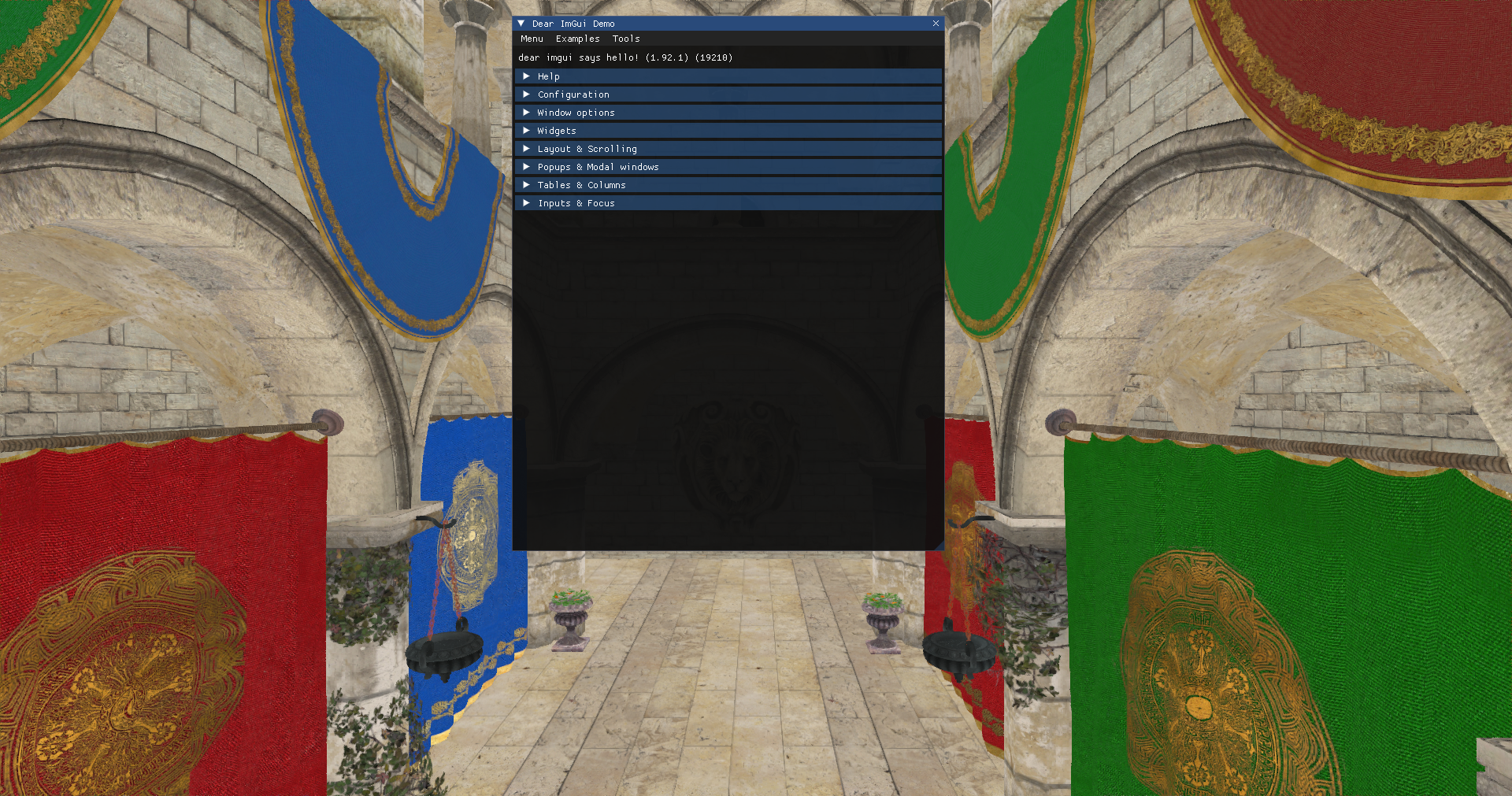
In this chapter we will add the capability to display Graphical User Interfaces (GUI) on top of the rendered scene. We will use the Dear ImGui library through the zgui bindings. ImGui is a light-weight GUI library render-agnostic which can be used with OpenGL, DirectX or Vulkan. We can construct complex GUIs, capable of reacting to user input, and get its output as vertex buffers which we can render in our application as other regular shapes. The purpose of this chapter is not to explain ImGui deeply, but to show how can it be integrated with our Vulkan based render pipeline.
You can find the complete source code for this chapter here.
zgui dependencies
We will need to add the zgui dependency to the build.zig.zon using the command: zig fetch --save https://github.com/zig-gamedev/zgui/archive/d6c4f53c2fbd54673790dc2a5208160a3586ef29.tar.gz.
We will need to update the build.zig file to include the zgui dependency in the eng and root modules:
File: build.zig
pub fn build(b: *std.Build) void {
    ...
    // ZGui
    const zguiDep = b.dependency("zgui", .{
        .shared = false,
        .with_implot = false,
    });
    const zgui = zguiDep.module("root");
    ...
    eng.addImport("zgui", zgui);
    ...
    eng.linkLibrary(zguiDep.artifact("imgui"));
    ...
    exe.root_module.addImport("zgui", zgui);
    ...
}
Render the GUI
In this case, we will be rendering the GUI elements over the scene. Since we do not want to apply any additional filtering, since ImGui applies its own gamma correction we will render the GUI after the post-processing stage. We will perform the render in a new struct named RenderGui which is defined in the src/eng/renderGui.zig and you should include in the mod.zig file (pub const rgui = @import("renderGui.zig");). It starts like this:
File: src/eng/renderGui.zig
const com = @import("com");
const eng = @import("mod.zig");
const std = @import("std");
const vk = @import("vk");
const vulkan = @import("vulkan");
const zgui = @import("zgui");
const zstbi = @import("zstbi");

const PushConstants = extern struct {
    scaleX: f32 = 1.0,
    scaleY: f32 = 1.0,
};

const GuiVtxBuffDesc = struct {
    const binding_description = vulkan.VertexInputBindingDescription{
        .binding = 0,
        .stride = @sizeOf(GuiVtxBuffDesc),
        .input_rate = .vertex,
    };

    const attribute_description = [_]vulkan.VertexInputAttributeDescription{
        .{
            .binding = 0,
            .location = 0,
            .format = .r32g32_sfloat,
            .offset = @offsetOf(GuiVtxBuffDesc, "pos"),
        },
        .{
            .binding = 0,
            .location = 1,
            .format = .r32g32_sfloat,
            .offset = @offsetOf(GuiVtxBuffDesc, "textCoords"),
        },
        .{
            .binding = 0,
            .location = 2,
            .format = .r8g8b8a8_unorm,
            .offset = @offsetOf(GuiVtxBuffDesc, "color"),
        },
    };

    pos: [2]f32,
    textCoords: [2]f32,
    color: u32,
};
The PushConstants struct defines the parameters that we will pass as push constants to the shaders used during GUI render. In this case we will pass a scale factor for x and y axis. The GuiVtxBuffDesc struct defines the vertex input structure that we will use in the shaders. We will see later on how that ImGui updates dynamically vertex information responding to the GUI drawing functions, and therefore, imposes a vertex structure which is defined by an x and y positions (We are rendering 2D GUIs), texture coordinates and a color. Let's continue with the code:
File: src/eng/renderGui.zig
const TXT_ID_GUI = "TXT_ID_GUI";
const DESC_ID_TEXT_SAMPLER = "GUI_DESC_ID_TEXT_SAMPLER";
const DESC_ID_TEXT_PFX = "GUI_DESC_ID_TEXT_PFX_";
const DEFAULT_VTX_BUFF_SIZE: usize = 1024;
const DEFAULT_IDX_BUFF_SIZE: usize = 2024;

pub const RenderGui = struct {
    descLayoutFrg: vk.desc.VkDescSetLayout,
    guiTextureCache: eng.tcach.TextureCache,
    textSampler: vk.text.VkTextSampler,
    vtxBuffers: []vk.buf.VkBuffer,
    idxBuffers: []vk.buf.VkBuffer,
    vkPipeline: vk.pipe.VkPipeline,

    pub fn create(allocator: std.mem.Allocator, io: std.Io, vkCtx: *vk.ctx.VkCtx) !RenderGui {
        // Init GUI
        try initGUI(allocator, vkCtx);
        errdefer zgui.deinit();

        // Textures
        const samplerInfo = vk.text.VkTextSamplerInfo{
            .addressMode = vulkan.SamplerAddressMode.repeat,
            .anisotropy = false,
            .borderColor = vulkan.BorderColor.float_opaque_black,
        };
        const textSampler = try vk.text.VkTextSampler.create(vkCtx, samplerInfo);
        errdefer textSampler.cleanup(vkCtx);

        // Push constants
        const pushConstants = [_]vulkan.PushConstantRange{.{
            .stage_flags = vulkan.ShaderStageFlags{ .vertex_bit = true },
            .offset = 0,
            .size = @sizeOf(PushConstants),
        }};

        // Descriptor Set layouts
        const descLayoutFrg = try vk.desc.VkDescSetLayout.create(
            allocator,
            vkCtx,
            &[_]vk.desc.LayoutInfo{.{
                .binding = 0,
                .descCount = 1,
                .descType = vulkan.DescriptorType.combined_image_sampler,
                .stageFlags = vulkan.ShaderStageFlags{ .fragment_bit = true },
            }},
        );
        errdefer descLayoutFrg.cleanup(vkCtx);

        const descSetLayouts = [_]vulkan.DescriptorSetLayout{descLayoutFrg.descSetLayout};

        // Shader modules
        var arena = std.heap.ArenaAllocator.init(std.heap.page_allocator);
        defer arena.deinit();
        const vertCode align(@alignOf(u32)) = try com.utils.loadFile(arena.allocator(), io, "res/shaders/gui_vtx.glsl.spv");
        const vert = try vkCtx.vkDevice.deviceProxy.createShaderModule(&.{
            .code_size = vertCode.len,
            .p_code = @ptrCast(@alignCast(vertCode)),
        }, null);
        defer vkCtx.vkDevice.deviceProxy.destroyShaderModule(vert, null);

        const fragCode align(@alignOf(u32)) = try com.utils.loadFile(arena.allocator(), io, "res/shaders/gui_frg.glsl.spv");
        const frag = try vkCtx.vkDevice.deviceProxy.createShaderModule(&.{
            .code_size = fragCode.len,
            .p_code = @ptrCast(@alignCast(fragCode)),
        }, null);
        defer vkCtx.vkDevice.deviceProxy.destroyShaderModule(frag, null);

        const modulesInfo = try allocator.alloc(vk.pipe.ShaderModuleInfo, 2);
        modulesInfo[0] = .{ .module = vert, .stage = .{ .vertex_bit = true } };
        modulesInfo[1] = .{ .module = frag, .stage = .{ .fragment_bit = true } };
        defer allocator.free(modulesInfo);

        // Pipeline
        const vkPipelineCreateInfo = vk.pipe.VkPipelineCreateInfo{
            .colorFormat = vkCtx.vkSwapChain.surfaceFormat.format,
            .descSetLayouts = descSetLayouts[0..],
            .pushConstants = pushConstants[0..],
            .modulesInfo = modulesInfo,
            .vtxBuffDesc = .{
                .attribute_description = @constCast(&GuiVtxBuffDesc.attribute_description)[0..],
                .binding_description = GuiVtxBuffDesc.binding_description,
            },
            .useBlend = true,
        };
        var vkPipeline = try vk.pipe.VkPipeline.create(allocator, vkCtx, &vkPipelineCreateInfo);
        errdefer vkPipeline.cleanup(vkCtx);
        ...
    }
    ...
};
The create function, as in the previous cases, is used to instantiate the RenderGui struct and starts by calling the initGUI function which initializes ImGui (we will see the implementation later on). After that, we create a texture sampler, define the push constants range, the descriptor set layouts, shader modules and create the pipeline. The create function continues like this:
File: src/eng/renderGui.zig
pub const RenderGui = struct {
    ...
    pub fn create(allocator: std.mem.Allocator, io: std.Io, vkCtx: *vk.ctx.VkCtx) !RenderGui {
        ...
        // Buffers
        const vtxBuffers = try allocator.alloc(vk.buf.VkBuffer, com.common.FRAMES_IN_FLIGHT);
        const idxBuffers = try allocator.alloc(vk.buf.VkBuffer, com.common.FRAMES_IN_FLIGHT);
        for (0..com.common.FRAMES_IN_FLIGHT) |i| {
            vtxBuffers[i] = try vk.buf.VkBuffer.create(
                vkCtx,
                DEFAULT_VTX_BUFF_SIZE,
                .{ .vertex_buffer_bit = true },
                @intFromEnum(vk.vma.VmaFlags.VmaAllocationCreateHostAccessSequentialWriteBit),
                vk.vma.VmaUsage.VmaUsageAuto,
                vk.vma.VmaMemoryFlags.MemoryPropertyHostVisibleBitAndCoherent,
            );
            idxBuffers[i] = try vk.buf.VkBuffer.create(
                vkCtx,
                DEFAULT_IDX_BUFF_SIZE,
                .{ .index_buffer_bit = true },
                @intFromEnum(vk.vma.VmaFlags.VmaAllocationCreateHostAccessSequentialWriteBit),
                vk.vma.VmaUsage.VmaUsageAuto,
                vk.vma.VmaMemoryFlags.MemoryPropertyHostVisibleBitAndCoherent,
            );
        }

        const guiTextureCache = eng.tcach.TextureCache.create();
        return .{
            .descLayoutFrg = descLayoutFrg,
            .guiTextureCache = guiTextureCache,
            .textSampler = textSampler,
            .vtxBuffers = vtxBuffers,
            .idxBuffers = idxBuffers,
            .vkPipeline = vkPipeline,
        };
    }
    ...
};
The next step is to build two arrays of buffers (as many as frame in flight). Those buffers will hold the vertices and associated indices to render the GUI. They will be updated each frame to reflect the GUI state. They will need to be permanently accessible by both the CPU and the GPU. We will create them initially with a default size although they can later change in size dynamically. We will see later how to populate them. We will also need an instance of TextureCache to host the textures associated with the GUI. With all that information we can create the structure.
We will need a cleanup function to free the resources:
File: src/eng/renderGui.zig
pub const RenderGui = struct {
    ...
    pub fn cleanup(self: *RenderGui, allocator: std.mem.Allocator, vkCtx: *const vk.ctx.VkCtx) void {
        for (self.vtxBuffers) |vkVuffer| {
            vkVuffer.cleanup(vkCtx);
        }
        defer allocator.free(self.vtxBuffers);
        for (self.idxBuffers) |vkVuffer| {
            vkVuffer.cleanup(vkCtx);
        }
        defer allocator.free(self.idxBuffers);
        self.textSampler.cleanup(vkCtx);
        self.descLayoutFrg.cleanup(vkCtx);
        self.vkPipeline.cleanup(vkCtx);
        self.guiTextureCache.cleanup(allocator, vkCtx);
        zgui.deinit();
    }
    ...
};
In the create function we used the initGUI function where we initialize the resources required by ImGui:
File: src/eng/renderGui.zig
pub const RenderGui = struct {
    ...
    fn initGUI(allocator: std.mem.Allocator, vkCtx: *const vk.ctx.VkCtx) !void {
        const extent = vkCtx.vkSwapChain.extent;
        zgui.init(allocator);
        zgui.io.setIniFilename(null);
        zgui.io.setBackendFlags(.{ .renderer_has_textures = true });
        zgui.io.setDisplaySize(@as(f32, @floatFromInt(extent.width)), @as(f32, @floatFromInt(extent.height)));
    }
    ...
};
In the initGUI method, we first need to call the init ImGui function. This should be the very first call prior to invoking any other ImGui functions. After that, we retrieve a reference to the io, and call the setIniFilename function with a null argument. The reason for doing that, is that ImGui, by default, will create a file named imgui.ini when the context is destroyed. This imgui.ini file will hold the position and size of the GUI elements, so they can be restored to their last positions. We will not be using that feature, so we set null as the parameter of the setIniFilename function to deactivate it. After that, we need to set the renderer_has_textures flag to true. By setting this we are telling ImGui that our render backend (the render which will be in charge to render to screen) has texture capabilities. In addition we will enable dynamic font textures which is required by modern ImGui features. After that we set the size of the display to match the render area., in our case, since we will be rendering after the post-processing stage it will match swap chain extent.
We will define a render function that looks like this:
File: src/eng/renderGui.zig
pub const RenderGui = struct {
    ...
    pub fn render(
        self: *RenderGui,
        vkCtx: *vk.ctx.VkCtx,
        engCtx: *const eng.engine.EngCtx,
        vkCmd: vk.cmd.VkCmdBuff,
        vkCmdPool: *vk.cmd.VkCmdPool,
        vkQueue: vk.queue.VkQueue,
        imageIndex: u32,
        frameIdx: u32,
    ) !void {
        if (!try self.updateBuffers(vkCtx, frameIdx)) {
            return;
        }

        const allocator = engCtx.allocator;
        const cmdHandle = vkCmd.cmdBuffProxy.handle;
        const device = vkCtx.vkDevice.deviceProxy;

        try self.updateGuiTextures(allocator, vkCtx, vkCmdPool, vkQueue);

        const renderAttInfo = vulkan.RenderingAttachmentInfo{
            .image_view = vkCtx.vkSwapChain.imageViews[imageIndex].view,
            .image_layout = vulkan.ImageLayout.color_attachment_optimal,
            .load_op = vulkan.AttachmentLoadOp.load,
            .store_op = vulkan.AttachmentStoreOp.store,
            .clear_value = vulkan.ClearValue{ .color = .{ .float_32 = .{ 0.0, 0.0, 0.0, 1.0 } } },
            .resolve_mode = vulkan.ResolveModeFlags{},
            .resolve_image_layout = vulkan.ImageLayout.attachment_optimal,
        };
        const extent = vkCtx.vkSwapChain.extent;
        const renderInfo = vulkan.RenderingInfo{
            .render_area = .{ .extent = extent, .offset = .{ .x = 0, .y = 0 } },
            .layer_count = 1,
            .color_attachment_count = 1,
            .p_color_attachments = &[_]vulkan.RenderingAttachmentInfo{renderAttInfo},
            .view_mask = 0,
        };

        device.cmdBeginRendering(cmdHandle, @ptrCast(&renderInfo));

        device.cmdBindPipeline(cmdHandle, vulkan.PipelineBindPoint.graphics, self.vkPipeline.pipeline);

        const viewPort = [_]vulkan.Viewport{.{
            .x = 0,
            .y = @as(f32, @floatFromInt(extent.height)),
            .width = @as(f32, @floatFromInt(extent.width)),
            .height = -1.0 * @as(f32, @floatFromInt(extent.height)),
            .min_depth = 0,
            .max_depth = 1,
        }};
        device.cmdSetViewport(cmdHandle, 0, &viewPort);

        self.setPushConstants(vkCtx, cmdHandle);

        const drawData = zgui.getDrawData();
        if (@intFromPtr(drawData) == 0) {
            return;
        }
        const offset = [_]vulkan.DeviceSize{0};
        device.cmdBindIndexBuffer(cmdHandle, self.idxBuffers[frameIdx].buffer, 0, vulkan.IndexType.uint16);
        device.cmdBindVertexBuffers(cmdHandle, 0, @ptrCast(&self.vtxBuffers[frameIdx].buffer), &offset);

        var descSets: [1]vulkan.DescriptorSet = undefined;

        var offsetIdx: u32 = 0;
        var offsetVtx: i32 = 0;
        const numCmds = @as(usize, @intCast(drawData.cmd_lists_count));
        for (0..numCmds) |i| {
            const cmd_list = drawData.cmd_lists.items[i];
            for (cmd_list.getCmdBuffer()) |cmd| {
                const x: i32 = @intFromFloat(cmd.clip_rect[0]);
                const y: i32 = @intFromFloat(cmd.clip_rect[1]);
                const z: i32 = @intFromFloat(cmd.clip_rect[2]);
                const w: i32 = @intFromFloat(cmd.clip_rect[3]);
                const scissor = [_]vulkan.Rect2D{.{
                    .offset = .{ .x = x, .y = y },
                    .extent = .{ .width = @intCast(z - x), .height = @intCast(w - y) },
                }};
                device.cmdSetScissor(cmdHandle, 0,  &scissor);

                const descSetInt = @intFromPtr(cmd.texture_ref.tex_data.?.backend_user_data.?);
                const descSet: vulkan.DescriptorSet = @enumFromInt(descSetInt);
                descSets[0] = descSet;

                device.cmdBindDescriptorSets(
                    cmdHandle,
                    vulkan.PipelineBindPoint.graphics,
                    self.vkPipeline.pipelineLayout,
                    0,
                    &descSets,
                    null,
                );

                device.cmdDrawIndexed(
                    cmdHandle,
                    @intCast(cmd.elem_count),
                    1,
                    offsetIdx + @as(u32, @intCast(cmd.idx_offset)),
                    offsetVtx + @as(i32, @intCast(cmd.vtx_offset)),
                    0,
                );
            }
            offsetIdx += @as(u32, @intCast(cmd_list.getIndexBufferLength()));
            offsetVtx += @as(i32, @intCast(cmd_list.getVertexBufferLength()));
        }
        device.cmdEndRendering(cmdHandle);
    }
    ...
};
The first thing that we do is to update the buffers that we will used to store vertices and indices. We will use separate buffers per frames in flight. We will use just a single buffer (one for vertices and one for indices) when rendering the GUI elements, that is, we will not have separate vertices buffers for the different GUI elements, just a single vertex buffer and a single index buffer. We will populate those buffers in the updateBuffers function which will return false if there is nothing to render. The next step is to call the updateGuiTextures function which will be used to dynamically build or update the textures used by the GUI. Modern ImGui library does not build a texture atlas at startup but can recreate the textures used to render the GUI dynamically, so we need to wait until we are rendering to create or update the textures. We will see the implementation later on. After that, we just do the usual steps, begin the render, bind the pipeline, set the view port and bind the vertex and indices buffers. Then, we set push constants to pass a scaling factor (composed by two floats). ImGui will use a coordinate system which sets (0, 0) at the top left corner of the screen and (width, height) as the bottom right corner, being width and height the values set in the ImGuiIO setDisplaySize method call. We need to transform from that coordinate system to one in the range of [-1, 1] for x and y axis, which will be done in the vertex shader with the help of that scaling factor.
The next step is to iterate over the ImGui draw data, which will help us to set the proper offsets over the vertices and indices buffers when calling cmdDrawIndexed. We also restrict the drawing area using the cmdSetScissor for each of the GUI elements to be rendered. For each of these elements, we will get the descriptor set associated to the texture using the backend_user_data of the TextureData struct. The updateGuiTextures function, in addition to create or update the textures will also create the required descriptor sets and store them in the backend_user_data attribute.
The setPushConstants function is defined like this:
File: src/eng/renderGui.zig
pub const RenderGui = struct {
    ...
    fn setPushConstants(self: *RenderGui, vkCtx: *const vk.ctx.VkCtx, cmdHandle: vulkan.CommandBuffer) void {
        const dispSize = zgui.io.getDisplaySize();
        const pushConstants = PushConstants{
            .scaleX = 2.0 / dispSize[0],
            .scaleY = -2.0 / dispSize[1],
        };

        vkCtx.vkDevice.deviceProxy.cmdPushConstants(
            cmdHandle,
            self.vkPipeline.pipelineLayout,
            vulkan.ShaderStageFlags{ .vertex_bit = true },
            0,
            @sizeOf(PushConstants),
            &pushConstants,
        );
    }
    ...
};
In the resize function we just update the display size of ImGui:
File: src/eng/renderGui.zig
pub const RenderGui = struct {
    ...
    pub fn resize(self: *RenderGui, vkCtx: *const vk.ctx.VkCtx) !void {
        _ = self;
        const extent = vkCtx.vkSwapChain.extent;
        zgui.io.setDisplaySize(
            @as(f32, @floatFromInt(extent.width)),
            @as(f32, @floatFromInt(extent.height)),
        );
    }
    ...
};
Let us review now the updateBuffers function:
File: src/eng/renderGui.zig
pub const RenderGui = struct {
    ...
    fn updateBuffers(self: *RenderGui, vkCtx: *const vk.ctx.VkCtx, frameIdx: u32) !bool {
        const drawData = zgui.getDrawData();
        if (@intFromPtr(drawData) == 0) {
            return false;
        }
        const vtxBuffSize: u64 = @as(u64, @intCast(drawData.total_vtx_count * @sizeOf(GuiVtxBuffDesc)));
        const idxBuffSize: u64 = @as(u64, @intCast(drawData.total_idx_count * @sizeOf(u16)));

        if (vtxBuffSize == 0 or idxBuffSize == 0) {
            return false;
        }

        if (self.vtxBuffers[frameIdx].size < vtxBuffSize) {
            const newBuffer = try vk.buf.VkBuffer.create(
                vkCtx,
                vtxBuffSize,
                .{ .vertex_buffer_bit = true },
                @intFromEnum(vk.vma.VmaFlags.VmaAllocationCreateHostAccessSequentialWriteBit),
                vk.vma.VmaUsage.VmaUsageAuto,
                vk.vma.VmaMemoryFlags.MemoryPropertyHostVisibleBitAndCoherent,
            );
            self.vtxBuffers[frameIdx].cleanup(vkCtx);
            self.vtxBuffers[frameIdx] = newBuffer;
        }
        const vtxBuffer = self.vtxBuffers[frameIdx];

        if (self.idxBuffers[frameIdx].size < idxBuffSize) {
            const newBuffer = try vk.buf.VkBuffer.create(
                vkCtx,
                idxBuffSize,
                .{ .index_buffer_bit = true },
                @intFromEnum(vk.vma.VmaFlags.VmaAllocationCreateHostAccessSequentialWriteBit),
                vk.vma.VmaUsage.VmaUsageAuto,
                vk.vma.VmaMemoryFlags.MemoryPropertyHostVisibleBitAndCoherent,
            );
            self.idxBuffers[frameIdx].cleanup(vkCtx);
            self.idxBuffers[frameIdx] = newBuffer;
        }
        const idxBuffer = self.idxBuffers[frameIdx];

        var vtxOffset: usize = 0;
        var idxOffset: usize = 0;
        const numCmds = @as(usize, @intCast(drawData.cmd_lists_count));

        const vtxBuffData = try vtxBuffer.map(vkCtx);
        defer vtxBuffer.unMap(vkCtx);
        const vtxGpuBuff: [*]GuiVtxBuffDesc = @ptrCast(@alignCast(vtxBuffData));

        const idxBuffData = try idxBuffer.map(vkCtx);
        defer idxBuffer.unMap(vkCtx);
        const idxGpuBuff: [*]u16 = @ptrCast(@alignCast(idxBuffData));

        for (0..numCmds) |i| {
            const cmd_list = drawData.cmd_lists.items[i];
            const vtxElemSize = @as(usize, @intCast(cmd_list.getVertexBufferLength()));
            const idxElemSize = @as(usize, @intCast(cmd_list.getIndexBufferLength()));

            const vtx_buffer_ptr: [*]GuiVtxBuffDesc = @ptrCast(@alignCast(cmd_list.getVertexBufferData()));
            const idx_buffer_ptr: [*]u16 = @ptrCast(@alignCast(cmd_list.getIndexBufferData()));

            const dstVtx = vtxOffset + vtxElemSize;
            const dstIdx = idxOffset + idxElemSize;

            @memcpy(vtxGpuBuff[vtxOffset..dstVtx], vtx_buffer_ptr[0..vtxElemSize]);
            @memcpy(idxGpuBuff[idxOffset..dstIdx], idx_buffer_ptr[0..idxElemSize]);

            vtxOffset += vtxElemSize;
            idxOffset += idxElemSize;
        }

        return true;
    }
    ...
};
As it has been described before, we will have two set of buffers, one for the vertices and the other one for the indices. We will have as many buffers frames in flight we have, We first check if drawData is null, which may be caused because we have not initialized the GUI or we do not have anything to render. After that, we retrieve the total size of the vertices and indices buffers to accommodate the render of the GUI elements in this frame. If there are no vertices or no indices, we just return. If the buffers do not have enough space we create new Vulkan buffers cleaning up the old ones. The buffers need to be accessed from both the GPU and the application so we set VmaAllocationCreateHostAccessSequentialWriteBit and MemoryPropertyHostVisibleBitAndCoherent flags. After that, we just copy the vertices and indices data to those buffers by iterating over the different ImGui drawing commands.
The updateGuiTextures function is defined like this:
File: src/eng/renderGui.zig
pub const RenderGui = struct {
    ...
    fn updateGuiTextures(
        self: *RenderGui,
        allocator: std.mem.Allocator,
        vkCtx: *vk.ctx.VkCtx,
        vkCmdPool: *vk.cmd.VkCmdPool,
        vkQueue: vk.queue.VkQueue,
    ) !void {
        const drawData = zgui.getDrawData();
        if (@intFromPtr(drawData) == 0) {
            return;
        }

        var numTextures: u32 = 0;
        const numCmds = @as(usize, @intCast(drawData.cmd_lists_count));
        for (0..numCmds) |i| {
            const cmd_list = drawData.cmd_lists.items[i];
            for (cmd_list.getCmdBuffer()) |cmd| {
                const textData = cmd.texture_ref.tex_data.?;
                if (textData.status != zgui.TextureStatus.want_updates and textData.status != zgui.TextureStatus.want_create) {
                    continue;
                }
                numTextures += 1;
                const numPixels = textData.width * textData.height * textData.bytes_per_pixel;
                const id = try std.fmt.allocPrint(allocator, "{s}{d}", .{ TXT_ID_GUI, textData.tex_id });
                defer allocator.free(id);
                const textureData = textData.pixels[0..@as(usize, @intCast(numPixels))];
                if (textData.status == zgui.TextureStatus.want_updates) {
                    var texture = try self.guiTextureCache.getTextureRef(id);
                    try texture.update(vkCtx, &textureData);
                } else {
                    const textureInfo = eng.tcach.TextureInfo{
                        .id = id,
                        .data = textureData,
                        .height = @as(u32, @intCast(textData.height)),
                        .width = @as(u32, @intCast(textData.width)),
                        .format = vulkan.Format.r8g8b8a8_srgb,
                    };
                    try self.guiTextureCache.addTexture(allocator, vkCtx, &textureInfo);
                    const idDesc = try std.fmt.allocPrint(allocator, "{s}{d}", .{ DESC_ID_TEXT_SAMPLER, textData.tex_id });
                    defer allocator.free(idDesc);
                    const descSet = try vkCtx.vkDescAllocator.addDescSet(
                        allocator,
                        vkCtx.vkPhysDevice,
                        vkCtx.vkDevice,
                        idDesc,
                        self.descLayoutFrg,
                    );
                    textData.backend_user_data = @ptrFromInt(@intFromEnum(descSet.descSet));
                    const texture = try self.guiTextureCache.getTexture(textureInfo.id);
                    descSet.setImage(vkCtx.vkDevice, texture.vkImageView, self.textSampler, 0);
                }

                textData.status = zgui.TextureStatus.ok;
            }
        }

        if (numTextures > 0) {
            try self.guiTextureCache.recordTextures(vkCtx, vkCmdPool, vkQueue);
        }
    }
};
We first check if there is no drawing data so we can return. After that we iterate over the drawing commands checking the TextureData status code. Since we enabled the renderer_has_textures flag in the initGUI function, any drawing code will have, at least, the default texture used by ImGui to render. In case we may have a widget with a specific image it may have a different texture than the default one, but the process will be same. If the texture is not in the creation (want_create) or update state (want_updates) we just continue.
For the textures that need to be created or updated, we first retrieve the texture data and create an unique identifier. The identifier will use the TextureData tex_id attribute which will be unique per texture. If want to update the texture, we just retrieve the associated texture form the cache (using the previously created identifier) and call a new function defined in the VkTexture struct to update the contents of the image. When updating the texture we need to access to get the texture reference from the tetxure cache since we need to update its state, therefore we invoke the getTextureRef function which return a reference to it, not a copy. This is a new function that we will add to the TextureCache struct.
If we need to create a new texture, we just fill the TextureInfo structure using the TextureData information, create the texture by adding to the texture cache, and create an associated descriptor set. After we have created the descriptor set, we need to update the backend_user_data attribute to store it and associate the image with the descriptor set.
When we have processed the texture we need to change its state to gui.TextureStatus.ok. Remember that the same texture may be associated to multiple drawing commands, so we need to avoid reprocessing the same texture again and again. Finally, we need to record the layout transition of the textures created or updated by calling the recordTextures over the guiTextureCache.
The renderGui.zig file provides also a utility function to create a zgui.TextureData instance. This may be used to associate an image to a ImGui widget. It takes a zstbi.Imagereference which will contain the image data, and an identifier which shall be unique. ImGui will use the 0 identifier for the default texture.
File: src/eng/renderGui.zig
pub fn createTextureData(texId: u32, textureImage: *const zstbi.Image) zgui.TextureData {
    return zgui.TextureData{
        .unique_id = @intCast(texId),
        .backend_user_data = null,
        .bytes_per_pixel = 4,
        .pixels = textureImage.data.ptr,
        .format = .rgba32,
        .width = @intCast(textureImage.width),
        .height = @intCast(textureImage.height),
        .status = .want_create,
        .tex_id = @enumFromInt(texId),
        .used_rect = .{
            .x = 0,
            .y = 0,
            .w = @intCast(textureImage.width),
            .h = @intCast(textureImage.height),
        },
        .update_Rect = .{
            .x = 0,
            .y = 0,
            .w = @intCast(textureImage.width),
            .h = @intCast(textureImage.height),
        },
        .updates = undefined,
        .unused_Frames = 0,
        .ref_count = 0,
        .use_colors = true,
        .want_destroy_next_frame = false,
    };
}
We will need to create two new shaders named gui_vtx.glsl and gui_frg.glsl so we need to include the in the build.zig file:
File: build.zig
pub fn build(b: *std.Build) void {
    ...
    const shaders = [_]Shader{
        ...
        .{ .path = "res/shaders/gui_vtx.glsl", .stage = "vertex" },
        .{ .path = "res/shaders/gui_frg.glsl", .stage = "fragment" },
    };
    ...
}
The vertex shader used for rendering the GUI (gui_vtx.glsl) is quite simple, we just transform the coordinates so they are in the [-1, 1] range and output the texture coordinates and color so they can be used in the fragment shader:
File: res/shaders/gui_vtx.glsl
#version 450

layout (location = 0) in vec2 inPos;
layout (location = 1) in vec2 inTextCoords;
layout (location = 2) in vec4 inColor;

layout (push_constant) uniform PushConstants {
    vec2 scale;
} pushConstants;

layout (location = 0) out vec2 outTextCoords;
layout (location = 1) out vec4 outColor;

out gl_PerVertex
{
    vec4 gl_Position;
};

void main()
{
    outTextCoords = inTextCoords;
    outColor = inColor;
    gl_Position = vec4(inPos * pushConstants.scale + vec2(-1.0, 1.0), 0.0, 1.0);
}
In the fragment shader (gui_frg.glsl) we just output the combination of the vertex color and the texture color associated to its texture coordinates:
File: res/shaders/gui_frg.glsl
#version 450

layout (location = 0) in vec2 inTextCoords;
layout (location = 1) in vec4 inColor;

layout (binding = 0) uniform sampler2D fontsSampler;

layout (location = 0) out vec4 outFragColor;

void main()
{
    outFragColor = inColor * texture(fontsSampler, inTextCoords);
}
Complete the changes
The VkTexture struct needs to be updated to add the new update function:
File: src/eng/vk/vkTexture.zig
pub const VkTexture = struct {
    ...
    pub fn update(self: *VkTexture, vkCtx: *const vk.ctx.VkCtx, data: *const []u8) !void {
        const dataSize = data.len;
        const vkStageBuffer = try vk.buf.VkBuffer.create(
            vkCtx,
            dataSize,
            vulkan.BufferUsageFlags{ .transfer_src_bit = true },
            @intFromEnum(vk.vma.VmaFlags.VmaAllocationCreateHostAccessSequentialWriteBit),
            vk.vma.VmaUsage.VmaUsageAuto,
            vk.vma.VmaMemoryFlags.MemoryPropertyHostVisibleBitAndCoherent,
        );
        errdefer vkStageBuffer.cleanup(vkCtx);
        try vk.buf.copyDataToBuffer(vkCtx, &vkStageBuffer, data);
        self.cleanupStgBuffer(vkCtx);
        self.vkStageBuffer = vkStageBuffer;
        self.recorded = false;
    }
}
We just create a new stating buffer with the image contents, copy the data to it and reset the recorded flag so the texture can layout can transition to the proper state when recording the layout transitions.
The new getTextureRef function in the TextureCache struct is defined like this:
File: src/eng/textureCache.zig
pub const TextureCache = struct {
    ...
pub fn getTextureRef(self: *const TextureCache, id: []const u8) !*vk.text.VkTexture {
    return self.textureMap.getPtr(id) orelse error.TextureNotFound;
}
    ...
};
Now we need to put the new RenderGui struct into play, so we will start with the changes in the Render struct:
File: src/eng/render.zig
pub const Render = struct {
    ...
    renderGui: eng.rgui.RenderGui,
    ...
    pub fn cleanup(self: *Render, allocator: std.mem.Allocator) void {
        ...
        self.renderGui.cleanup(allocator, &self.vkCtx);
        ...
    }
    ...
    pub fn create(allocator: std.mem.Allocator, io: std.Io, constants: com.common.Constants, window: sdl3.video.Window) !Render {
        ...
        var renderGui = try eng.rgui.RenderGui.create(allocator, io, &vkCtx);
        errdefer renderGui.cleanup(allocator, &vkCtx);
        ...
        return .{
            ...
            .renderGui = renderGui,
            ...
        };
    }
    ...
    pub fn render(self: *Render, engCtx: *eng.engine.EngCtx) !void {
        ...
        self.renderInitPost(vkCmdBuff, imageIndex);
        try self.renderPost.render(&self.vkCtx, engCtx, vkCmdBuff, imageIndex);
        try self.renderGui.render(
            &self.vkCtx,
            engCtx,
            vkCmdBuff,
            &self.cmdPools[0],
            self.queueGraphics,
            imageIndex,
            self.currentFrame,
        );
        self.renderFinishPost(vkCmdBuff, imageIndex);
        ...
    }
    ...
    fn resize(self: *Render, engCtx: *eng.engine.EngCtx) !void {
        ...
        try self.renderScn.resize(&self.vkCtx, engCtx);
        try self.renderPost.resize(&self.vkCtx, &self.attColor);
        try self.renderGui.resize(&self.vkCtx);
    }
}
We need to instantiate the RenderGui struct in the Render create function and free it in the cleanup one. In the render function we just call the RenderGui function after we have finished with post-processing.
We will also need to modify the Wnd struct to properly handle text input in ImGui. We will first enable text input processing in SDL3. By doing so, we will be able to get tetx input processed and handle properly the text taking into consideration the keyboard layout and the state of special keys (such as caps lock, etc.):
File: src/eng/wnd.zig
...
const zgui = @import("zgui");
...
pub const Wnd = struct {
    ...
    pub fn create(wndTitle: [:0]const u8) !Wnd {
        ...
        try sdl3.keyboard.startTextInput(window);
        ...
    }
    ...
};
In the pollEvents function we will react to mouse_wheel, key_up, key_down and text_input events (If we do not call the startTextInput function we would not receive the text_input event):
File: src/eng/wnd.zig
pub const Wnd = struct {
    ...
    pub fn pollEvents(self: *Wnd) !void {
        ...
        while (sdl3.events.poll()) |event| {
            switch (event) {
                .quit, .terminating => self.closed = true,
                .mouse_motion => {
                    self.mouseState.deltaX += event.mouse_motion.x_rel;
                    self.mouseState.deltaY += event.mouse_motion.y_rel;
                },
                .mouse_wheel => {
                    processMouseWheel(event.mouse_wheel.scroll_x, event.mouse_wheel.scroll_y);
                },
                .key_down => {
                    processKey(event.key_down.key.?, event.key_down.down);
                },
                .key_up => {
                    processKey(event.key_up.key.?, event.key_up.down);
                },
                .text_input => {
                    processTextInput(event.text_input.text);
                },
                .window_resized => {
                    self.resized = true;
                },
                else => {},
            }
        }
        ...
    }
    ...
};
The functions used in the event loop are defined like this:
File: src/eng/wnd.zig
pub const Wnd = struct {
    ...
    fn processMouseWheel(x: f32, y: f32) void {
        if (zgui.io.getWantCaptureMouse()) {
            zgui.io.addMouseWheelEvent(x, y);
        }
    }

    fn processTextInput(text: [:0]const u8) void {
        if (zgui.io.getWantCaptureKeyboard()) {
            zgui.io.addInputCharactersUTF8(text);
        }
    }

    fn processKey(keyCode: sdl3.keycode.Keycode, keyDown: bool) void {
        if (!zgui.io.getWantCaptureKeyboard()) {
            return;
        }

        const result = toZgui(keyCode);

        if (result) |key| {
            zgui.io.addKeyEvent(key, keyDown);
        }
    }
    ...
};
The processMouseWheel function just passes the mouse wheel changes to ImGui if it the mouse is over the ImGui window (the getWantCaptureMouse function will return true in this case). The processTextInput just receives the text entered by the user if ImGui wants to process keyboard events (that is, the mouse is over an ImGui Window). The processKey function is called to process key up and key down events and pass them to ImGui. We need to translate from SDL3 key codes to ImGui key codes by calling the toZgui function which is defined like this:
File: src/eng/wnd.zig
pub const Wnd = struct {
    ...
    fn toZgui(keyCode: sdl3.keycode.Keycode) ?zgui.Key {
        return switch (keyCode) {
            .escape => zgui.Key.escape,
            .backspace => zgui.Key.back_space,
            .tab => zgui.Key.tab,
            .return_key => zgui.Key.enter,

            .right => zgui.Key.right_arrow,
            .left => zgui.Key.left_arrow,
            .down => zgui.Key.down_arrow,
            .up => zgui.Key.up_arrow,

            .func1 => zgui.Key.f1,
            .func2 => zgui.Key.f2,
            .func3 => zgui.Key.f3,
            .func4 => zgui.Key.f4,
            .func5 => zgui.Key.f5,
            .func6 => zgui.Key.f6,
            .func7 => zgui.Key.f7,
            .func8 => zgui.Key.f8,
            .func9 => zgui.Key.f9,
            .func10 => zgui.Key.f10,
            .func11 => zgui.Key.f11,
            .func12 => zgui.Key.f12,

            .left_ctrl => zgui.Key.left_ctrl,
            .right_ctrl => zgui.Key.right_ctrl,
            .left_shift => zgui.Key.left_shift,
            .right_shift => zgui.Key.right_shift,
            .left_alt => zgui.Key.left_alt,
            .right_alt => zgui.Key.right_alt,

            .a => zgui.Key.a,
            .b => zgui.Key.b,
            .c => zgui.Key.c,
            .d => zgui.Key.d,
            .e => zgui.Key.e,
            .f => zgui.Key.f,
            .g => zgui.Key.g,
            .h => zgui.Key.h,
            .i => zgui.Key.i,
            .j => zgui.Key.j,
            .k => zgui.Key.k,
            .l => zgui.Key.l,
            .m => zgui.Key.m,
            .n => zgui.Key.n,
            .o => zgui.Key.o,
            .p => zgui.Key.p,
            .q => zgui.Key.q,
            .r => zgui.Key.r,
            .s => zgui.Key.s,
            .t => zgui.Key.t,
            .u => zgui.Key.u,
            .v => zgui.Key.v,
            .w => zgui.Key.w,
            .x => zgui.Key.x,
            .y => zgui.Key.y,
            .z => zgui.Key.z,

            .zero => zgui.Key.zero,
            .one => zgui.Key.one,
            .two => zgui.Key.two,
            .three => zgui.Key.three,
            .four => zgui.Key.four,
            .five => zgui.Key.five,
            .six => zgui.Key.six,
            .seven => zgui.Key.seven,
            .eight => zgui.Key.eight,
            .nine => zgui.Key.nine,

            .space => zgui.Key.space,
            .apostrophe => zgui.Key.apostrophe,
            .comma => zgui.Key.comma,
            .period => zgui.Key.period,
            .slash => zgui.Key.slash,
            .semicolon => zgui.Key.semicolon,
            .backslash => zgui.Key.back_slash,
            .equals => zgui.Key.equal,
            .minus => zgui.Key.minus,
            .grave => zgui.Key.grave_accent,
            .left_bracket => zgui.Key.left_bracket,
            .right_bracket => zgui.Key.right_bracket,

            .kp_0 => zgui.Key.keypad_0,
            .kp_1 => zgui.Key.keypad_1,
            .kp_2 => zgui.Key.keypad_2,
            .kp_3 => zgui.Key.keypad_3,
            .kp_4 => zgui.Key.keypad_4,
            .kp_5 => zgui.Key.keypad_5,
            .kp_6 => zgui.Key.keypad_6,
            .kp_7 => zgui.Key.keypad_7,
            .kp_8 => zgui.Key.keypad_8,
            .kp_9 => zgui.Key.keypad_9,
            .kp_plus => zgui.Key.keypad_add,
            .kp_minus => zgui.Key.keypad_subtract,
            .kp_multiply => zgui.Key.keypad_multiply,
            .kp_divide => zgui.Key.keypad_divide,
            .kp_decimal => zgui.Key.keypad_decimal,
            .kp_enter => zgui.Key.keypad_enter,

            .delete => zgui.Key.delete,
            .insert => zgui.Key.insert,
            .home => zgui.Key.home,
            .end => zgui.Key.end,
            .page_up => zgui.Key.page_up,
            .page_down => zgui.Key.page_down,

            else => zgui.Key.space,
        };
    }
    ...
}
The final step is to modify the Game struct:
File: src/main.zig
const Game = struct {
    defaultGui: bool = true,
    textureData: ?zgui.TextureData = null,
    textureImage: ?zstbi.Image = null,
    ...
    pub fn cleanup(self: *Game) void {
        if (self.textureImage) |*img| {
            img.deinit();
        }
    }

    pub fn init(self: *Game, engCtx: *eng.engine.EngCtx, arenaAlloc: std.mem.Allocator) !eng.engine.InitData {
        ...
        const textureImage = try zstbi.Image.loadFromFile("res/textures/vulkan.png", 4);
        self.textureImage = textureImage;

        self.textureData = eng.rgui.createTextureData(1, &textureImage);
        ...
    }

    fn handleGui(self: *Game, engCtx: *eng.engine.EngCtx) bool {
        const mouseState = engCtx.wnd.mouseState;
        zgui.io.addMousePositionEvent(mouseState.x, mouseState.y);
        zgui.io.addMouseButtonEvent(zgui.MouseButton.left, mouseState.flags.left);
        zgui.io.addMouseButtonEvent(zgui.MouseButton.middle, mouseState.flags.middle);
        zgui.io.addMouseButtonEvent(zgui.MouseButton.right, mouseState.flags.right);

        var open = true;
        if (self.defaultGui) {
            zgui.newFrame();
            zgui.showDemoWindow(&open);
            zgui.render();
        } else {
            const textRef = zgui.TextureRef{
                .tex_id = self.textureData.?.tex_id,
                .tex_data = &self.textureData.?,
            };
            zgui.newFrame();
            zgui.setNextWindowPos(.{ .x = 0, .y = 0 });
            zgui.setNextWindowSize(.{ .w = 300, .h = 300 });
            _ = zgui.begin("Test Window", .{ .popen = &open });
            zgui.image(textRef, .{ .w = 300, .h = 300 });
            zgui.end();
            zgui.endFrame();
            zgui.render();
        }

        return zgui.io.getWantCaptureKeyboard() or zgui.io.getWantCaptureMouse();
    }

    pub fn input(self: *Game, engCtx: *eng.engine.EngCtx, deltaSec: f32) void {
        if (self.handleGui(engCtx)) {
            return;
        }
        ...
        if (engCtx.wnd.isKeyPressed(sdl3.Scancode.one)) {
            self.defaultGui = true;
        } else if (engCtx.wnd.isKeyPressed(sdl3.Scancode.two)) {
            self.defaultGui = false;
        }
        ...
    }
    ...
};
We have two possible GUI Windows to show, the default ImGui demo window and a simple one window which shows a texture. ImGui is an immediate mode library, therefore, we need to define the GUI contents in each frame, so we put that code in a handleGui function which is invoked by the input one. It returns a bool indictaing if the input has been processed by ImGui components. In order to use an image with an ImGui widget we need to create zgui.TextureData instance which is created in the init function. We will show the demo window when pressing the 1 key and the simple window with an image when pressing the 2 key.